



Your cleaning crew shows up Monday morning. Six houses on the schedule, two teams ready to roll. Sarah pulls up Google Maps while Miguel starts mentally grouping jobs by neighborhood. Twenty minutes later, they're still arguing about whether to hit the downtown offices first or wait until after lunch when parking opens up.
Sound familiar? Most cleaning operations under 10 vehicles deal with this every single morning. And the strange part is that fancy routing software often makes things worse for small fleets, not better. After watching dozens of cleaning companies try—and quietly abandon—expensive routing platforms, the pattern becomes pretty clear: manual routing with the right rules usually wins until you're somewhere around 12-15 vehicles.
Why automated routing fails for small cleaning operations
Route optimization software has a core assumption problem. The algorithms expect perfect conditions—teams hitting every stop on schedule, clients always home, traffic behaving predictable. In the real world of residential cleaning, Mrs. Peterson needs you there before 10am for her doctor's appointment, the Johnsons' gate code changes every other week, and that "30-minute" office clean stretches to 45 when nobody mentions the conference room disaster from the weekend.
Small cleaning operations need flexibility more than mathematical perfection. When you've got three teams and know every client personally, the human brain processes variables that software simply can't reach. Your lead cleaner knows the Williams family has a massive dog that needs to be put away before anyone walks in. She remembers parking at the dental office becomes impossible after 2pm. These details matter more than shaving four minutes off a drive.
The math gets shakier when you factor in software costs. Most routing platforms run somewhere between $200-400 per month for small fleets. For a cleaning company doing $30k monthly at tight margins, that's a real chunk of profit going toward minimal time savings. These systems also need constant maintenance—updating customer notes, adjusting time windows, fixing address errors. By the time you've managed all the exceptions, you've spent more time than manual planning would have taken in the first place.
Manual clustering rules that actually work
The clustering approach below works for roughly 80% of small cleaning operations. Instead of optimizing purely for distance, you're grouping jobs by practical zones that match how your teams actually move through the day.
Stop losing bookings in operational chaos.
Wipyly helps you manage, confirm, and optimize every cleaning appointment efficiently.
- Centralized booking management
- Automated client notifications
- Staff scheduling & route optimization
No credit card required
Start by dividing your service area into 4-6 major zones—not by ZIP codes or arbitrary lines, but by natural driving patterns. North of the highway might be one zone. Everything west of Main Street becomes another. The industrial area with all those offices forms its own cluster. These zones should reflect real traffic behavior, not just geography. That subdivision that looks close on a map but requires a 15-minute detour around the lake? Different zone.
Within each zone, establish anchor points—usually your biggest or most time-sensitive clients. If you clean a 40-unit apartment complex every Monday, that's an anchor. The medical office that needs service before they open at 7am, that's an anchor. Build routes around these fixed points rather than trying to optimize every single stop.
The clustering template that handles most situations:
Morning routes (before 10am):
-
Commercial clients who need early service
-
Residential clients with specific morning requirements
-
Jobs in school zones (before pickup traffic)
Mid-day routes (10am-2pm):
-
Flexible residential clients
-
Apartment complexes with daytime access
-
Office buildings with good parking
Afternoon routes (2pm-6pm):
-
Working families who prefer later service
-
Commercial clients closing early
-
Final pickup for supplies or equipment
Time windows matter more than distance for cleaning routes. A slightly longer route that respects client preferences generates fewer complaints, better reviews, and higher retention than a mathematically perfect route that inconveniences people.
Sequencing heuristics for different cleaning job types
Once you've got your clusters, sequencing is the next puzzle. The textbook approach says minimize left turns and backtracking. Reality says different job types need different logic entirely.
For residential routes, use what I'd call "complexity descent" ordering. Start with your most complicated or uncertain jobs early, when the team has maximum energy and buffer time available. That new client with unclear instructions? First stop. The house with the aggressive dog? While everyone's fresh. Simple maintenance cleans for long-term clients go later, when you can afford a small delay. This reverses traditional routing logic, but it cuts stress and mistakes.
Commercial routes flip this. Start with your easiest, most predictable stops to build momentum—small offices, regular maintenance cleans, familiar spaces. Save the complex medical facilities or post-construction cleanups for mid-route when the team is in rhythm but not exhausted. This approach typically cuts complaint rates noticeably compared to random sequencing.
Mixed routes (residential plus commercial) need bridge jobs—clients who are flexible on timing and can absorb schedule variation. That yoga studio needing trash and bathrooms handled between noon and 4pm? Perfect bridge. The retired couple who's home all day and genuinely doesn't care when you show up? They become your buffer between morning offices and afternoon residentials.
Buffer time and contingency rules
Every experienced cleaning operator figures this out eventually: padding your schedule isn't laziness, it's how you survive the week. The question is how much buffer and where to put it.
For residential routes, build 8-12 minutes of buffer per stop, loaded toward the end of each route segment—not evenly distributed, because even distribution just creates cumulative delays. Instead, add 20-25 minute buffers after every third or fourth stop. This gives teams real recovery windows for chatty clients, unexpected messes, or traffic problems without blowing up the rest of the day.
Commercial routes need a different approach. Tighter time requirements but more predictable scope. Use 5-7 minute buffers per stop, plus one major 30-minute float block that can slide anywhere in the route. When everything runs smooth, that float becomes detail work on a high-value client. When chaos hits, it's your lifeline.
The contingency matrix for the most common problems:
Client not home/can't access:
-
Skip and add to end of route if within the same zone
-
Punt to next day if it requires a zone change
-
Call from the previous stop to confirm—not from the driveway
Job takes 20+ minutes extra:
-
Text the next client about the delay immediately
-
Pull forward any flexible appointments
-
Offer next-day service with a small discount if needed
Vehicle breakdown or team sick:
-
Prioritize commercial clients and weekly residentials
-
Defer bi-weekly and monthly clients
-
Redistribute must-do jobs across remaining teams by zone, not equally
Supply shortage discovered mid-route:
-
Designated resupply points in each zone
-
Emergency supply caches at major commercial clients
-
Team overlap points for supply sharing
Once your contingency rules are mapped, a visual of how a typical day flows from morning cluster through afternoon wrap-up helps dispatchers make faster calls when things shift.
Add 20-25 minute buffers after every third or fourth residential stop rather than spreading minutes evenly.
Here's a simple flow to visualize the day-of routing process.
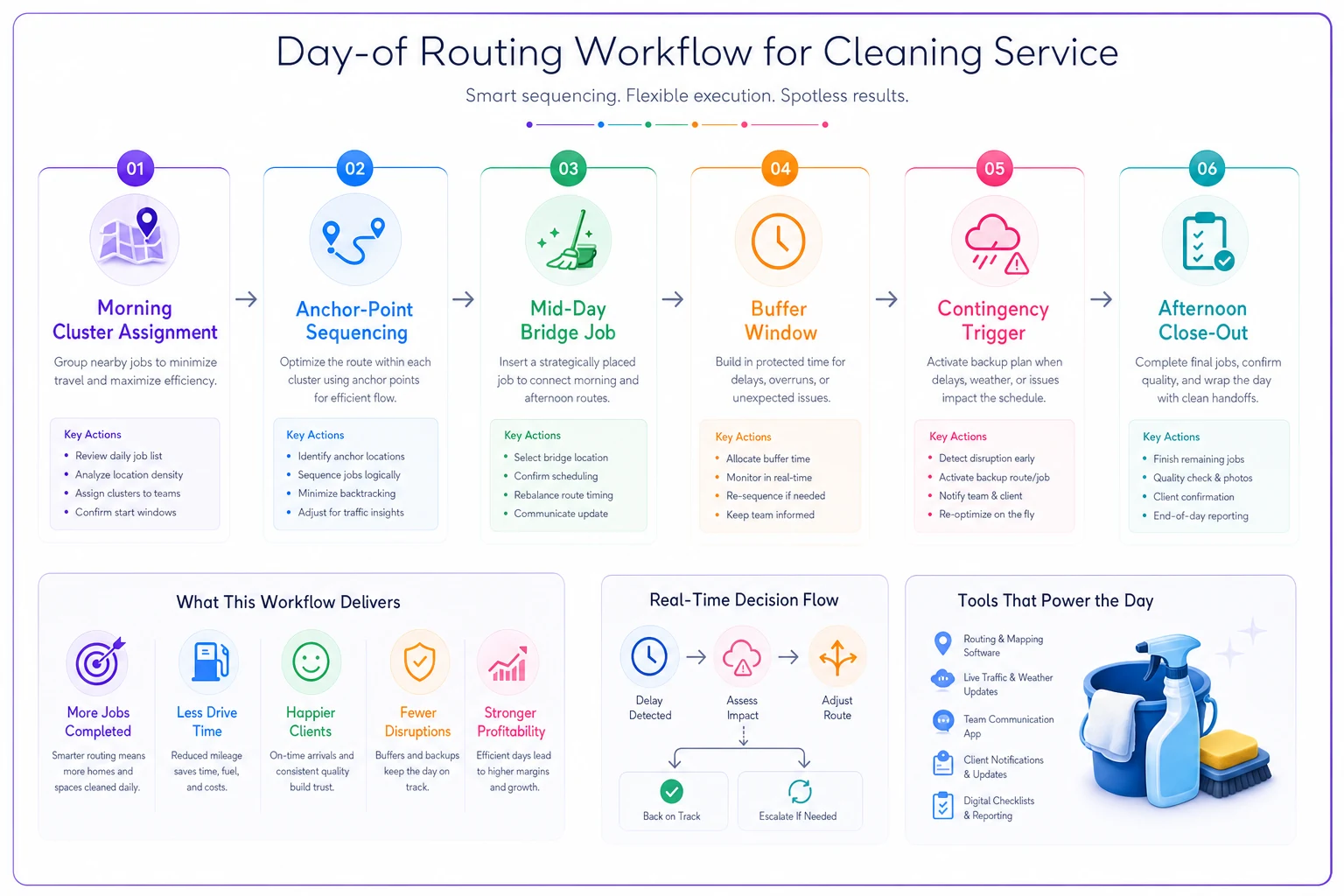
After your contingency rules are in place, dispatchers will spend less time improvising and more time executing. That alone is worth the effort of building them out properly.
Zone ownership vs. daily assignment models
This is probably the most important structural decision for small fleet efficiency: do teams own specific zones, or do you assign routes daily based on demand?
Zone ownership means each team consistently handles the same geographic area. They learn the quirks, build client relationships, and naturally optimize their own routes over time. Quality tends to improve because teams feel accountable for "their" territory. The downside is inflexibility—when Team A's zone is light and Team B is slammed, options are limited.
Daily assignment maximizes flexibility. You can balance workload, respond to sick calls easily, and scale up or down without much friction. But clients see different faces each visit, teams waste time relearning locations, and quality consistency gets harder to maintain.
For most 3-8 vehicle operations, a hybrid approach works best: core zone ownership with flex boundaries. Each team owns roughly 70% of their routes as regular clients in their zone. The remaining 30% floats based on daily needs. Teams maintain consistency with their core clients while the operation keeps flexibility.
Here's what this looks like on a Tuesday morning with 6 teams:
-
Teams 1-5 start in their regular zones
-
Team 6 fills gaps across all zones
-
If Team 3 calls in sick, Team 6 covers their core clients while others absorb the flex jobs
-
New clients get assigned to whoever has capacity, then transition to a permanent team after a few cleanings
This structure typically reduces drive time by 15-20% compared to pure daily assignment, while keeping most of the flexibility intact.
| Model | Consistency | Flexibility | Best For |
|---|---|---|---|
| Zone ownership | High | Low | Stable, repeat-client operations |
| Daily assignment | Low | High | Variable demand or seasonal work |
| Hybrid (70/30) | Medium-High | Medium | Most 3-8 vehicle cleaning fleets |
Most operations end up on the hybrid model—usually after trying the other two first and learning the hard way.
Real problems with manual routing at scale
Manual routing starts breaking somewhere around 8-10 vehicles, and it's not really about complexity—it's about error rate and the time it consumes.
When you're manually planning routes for 10 teams, small mistakes compound fast. Forget that the Smiths are out of town this week? That's 40 minutes of wasted drive time. Miss that two jobs are in the same building? There goes efficiency. Don't notice that Team 4 and Team 7 are both hitting the same neighborhood? You just doubled fuel costs for that area.
The time burden gets heavy too. A solid dispatcher spends 60-90 minutes planning the next day's routes for 10 vehicles. That's 7-10 hours weekly just on routing, not counting adjustments and crisis management. At 15 vehicles, you're looking at a couple of hours every single day.
Communication becomes the real bottleneck though. With manual routing, every change triggers a chain of phone calls and texts. Client cancels at 9am? Now you're calling the team, figuring out who's nearby, reshuffling the rest of the day, and notifying everyone affected. By vehicle 12 or 13, you're spending more time coordinating changes than you are cleaning houses.
When to switch to routing automation
The tipping point for route optimization software isn't really about fleet size—it's about operational patterns. Watch for these three signals.
-
Your dispatcher consistently spends over 2 hours daily on routing tasks. Not occasionally during busy seasons, but regularly. Once routing becomes a significant chunk of someone's full-time job, automation starts paying for itself in freed labor.
-
Route-related mistakes cost more than $500 monthly. Missed appointments, wrong addresses, scheduling conflicts, unnecessary drive time—track these for one month. Include fuel waste, overtime from poor sequencing, and customers lost because of routing errors. Most companies hit this threshold somewhere around 10-12 vehicles.
-
You can't answer basic routing questions without hours of spreadsheet work. How many miles did Team 3 drive last Tuesday? Which zones are most profitable per hour? What's the average travel time between jobs? If pulling that data is a project, you've outgrown manual systems.
The sweet spot for switching typically falls between 12-15 vehicles for most cleaning operations. Below that, manual routing with solid rules beats software. Above it, the complexity and error rate make automation worthwhile despite its real limitations.
Building your transition plan
Moving from manual to automated routing doesn't have to be chaotic. The companies that handle it well phase things in gradually rather than flipping a switch.
Start by automating just new client scheduling while keeping existing routes manual. This lets you learn the software without disrupting established patterns. After a month, migrate one zone or team as a pilot. Work out the problems in a contained experiment before expanding.
The parallel run period matters more than vendors ever admit. Run both manual and automated routing simultaneously for at least two weeks. Compare the outputs. Where does the software make obviously bad choices? Which suggestions actually beat human planning? You'll quickly find the spots where manual override stays necessary.
A realistic transition timeline for a 12-vehicle operation:
-
Weeks 1-2 Software setup, address importing, client preferences
-
Weeks 3-4 Parallel run with one team
-
Weeks 5-8 Expand to half the fleet, refine rules
-
Weeks 9-12 Full deployment with manual override for complex situations
-
Week 13+ Optimization and fine-tuning based on real results
Budget 20-25 hours of setup time, not the "2-hour onboarding" that vendors tend to promise. That includes data cleaning, preference setting, team training, and the inevitable troubleshooting.
The operational reality check
Route optimization software vendors show 30% mileage reduction, 25% time savings, 40% more jobs per day. Actual results for small cleaning fleets tend to land more like 8-12% mileage reduction, 10-15% time savings, and maybe one extra job per team per day.
That's still real value. For a 10-vehicle operation doing $100k monthly, even a 10% efficiency gain means meaningful additional revenue without adding teams. But it's not the transformation that sales demos suggest.
The actual value from automation comes from consistency and scalability, not pure optimization. Automated routing ensures every dispatcher makes decent decisions, not just your experienced ones. It handles growth without proportionally increasing administrative burden. And it creates data visibility that manual systems simply can't match—you'll finally know which clients, zones, and job types actually make money.
For operations under 10 vehicles, solid manual routing beats mediocre automation every time. Master the clustering rules, sequencing patterns, and buffer strategies first. Build zone ownership that makes sense for how your business actually operates. Create contingency plans that hold up when things go sideways. Then, when growth demands it, you'll move to automation from a position of strength rather than desperation.
The cleaning companies that scale well don't chase perfect routing—they build operations that work despite imperfection. Whether that's through manual templates or routing software matters less than having clear rules, consistent execution, and enough flexibility to adapt when reality doesn't cooperate with the plan.
Ready to simplify your cleaning operations?
Join 1,000+ cleaning businesses using Wipyly to save time, reduce scheduling conflicts, and enhance client satisfaction.