


Most cleaning companies don't fail at buying software. They fail at the pilot. The contract gets signed, two crews get a login, somebody schedules a "training," and three weeks later half the team is still texting photos to a supervisor and updating the master spreadsheet at midnight. Nobody declared the pilot dead. It just quietly stopped, and now there's a $900/month subscription nobody trusts.
This is a prescriptive four‑week plan to avoid exactly that. It assumes you've already picked a tool, you already run on spreadsheets, and you want to know — with numbers, not vibes — whether to roll it out company‑wide. If you want the broader strategic view of phased rollouts and governance, the cleaning software migration and crew‑adoption playbook covers the long game. This piece is the tactical, calendar‑driven version: what to do Monday, what to measure Friday, and when to pull the plug.
Before Week 1: What "pilot‑ready" actually means
A pilot isn't a free trial. A trial has no exit criteria. A pilot does. If you can't fill in the sentence "We roll out if X, we fix‑and‑retest if Y, we walk away if Z," you're not running a pilot — you're running a hope.
A few ground rules that prevent the most common failure mode — ambiguous results nobody can act on:
-
Pick one region or one supervisor's book of business. Not "two volunteers from different branches." You want a contained unit where one person owns the outcome.
-
Pilot a representative mix, not your best crews. If you only test with your sharpest lead and three favorite cleaners, you'll get a glowing result that collapses at scale. Include at least one crew that's skeptical or less tech‑comfortable.
-
Freeze the spreadsheet in parallel. During the pilot, both systems run. That dual‑entry is annoying for four weeks and it's the only way to confirm whether the app is actually capturing reality.
-
Size it right. Somewhere around 3–6 crews, 2 supervisors, and roughly 150–350 cleaning jobs over four weeks generates real signal without betting the company.
The KPIs you'll live and die by
1. Shift Adoption Rate > Shift Adoption = (Shifts clocked in through the app ÷ Total scheduled shifts) × 100 Count a shift as "adopted" only if both clock‑in and clock‑out happened in the app. A clock‑in with no clock‑out is a half‑used feature and it lies to you about adoption.
2. Task Completion Rate > Task Completion = (Tasks marked complete with required evidence ÷ Tasks assigned) × 100 The phrase with required evidence matters. If your checklist items require a photo or a signature and the crew just taps "done," that's not completion — that's a tap. Decide upfront which tasks need evidence and hold the line.
3. Response Lag > Response Lag = Median(timestamp of supervisor acknowledgment − timestamp of exception raised) Measure in minutes, use the median not the average (one four‑hour outlier at 2am will wreck a mean), and only count exceptions raised during working hours.
Set a target, a floor, and a stretch for each before you start. Example targets for a first pilot:
| KPI | Floor (minimum to pass) | Target | Stretch |
|---|---|---|---|
| Shift Adoption | 80% | 92% | 98% |
| Task Completion (w/ evidence) | 75% | 88% | 95% |
| Response Lag (median) | ≤ 45 min | ≤ 20 min | ≤ 8 min |
These aren't universal truths — a healthcare account with strict evidence rules will run different numbers than a small‑office maintenance route. But writing them down converts the end‑of‑pilot meeting from an opinion fight into reading numbers off a dashboard.
The RACI: who owns what
Pilots drift when "everyone's kind of responsible." Assign these five roles explicitly. One person can wear two hats in a small company, but write it down anyway.
Stop losing bookings in operational chaos.
Wipyly helps you manage, confirm, and optimize every cleaning appointment efficiently.
- Centralized booking management
- Automated client notifications
- Staff scheduling & route optimization
No credit card required
| Activity | Pilot Lead | Ops Supervisor | Crew Lead | Data/Admin | Owner/Sponsor |
|---|---|---|---|---|---|
| Set KPI targets & decision gates | A | C | I | C | R |
| Data migration & dedupe | C | I | I | R/A | I |
| Micro‑training delivery | R/A | R | C | I | I |
| Daily exception triage | A | R | C | C | I |
| KPI dashboard & reconciliation | A | C | I | R | I |
| Go/No‑Go decision | R | C | I | C | A |
| Rollback execution | A | R | C | R | C |
(R = Responsible, A = Accountable, C = Consulted, I = Informed)
The role that gets skipped most often is Data/Admin on reconciliation. Somebody has to sit between the app's export and the old spreadsheet every few days and confirm they agree. If no one owns it, you reach week four with two sources of truth and no idea which one is wrong.
Data Migration: get this wrong and the pilot never recovers
If crews open the app on day one and client names are misspelled, three sites are duplicated, and two closed accounts are still active, you've lost them. First impressions on data quality set the entire tone for the pilot.
Minimum CSV schema
``
clientid, clientname, siteid, sitename, addressline1,
city, state, zip, servicetype, frequency, scheduledday,
crewassigned, slatier, accessnotes, activeflag, lastservice_date
``
A few field rules that prevent the majority of migration pain:
-
clientidandsiteidmust be unique and stable. If your spreadsheet uses client name as the key, generate IDs now — names change, IDs shouldn't. -
frequencyshould use a controlled vocabulary (daily,weekly,biweekly,monthly), not free text like "every other Tues‑ish." -
active_flagisY/Nonly. That's how you avoid dragging ghost accounts into the pilot.
Dedupe rules
-
Exact match on
address_line1 + zip→ flag as likely duplicate site. -
Fuzzy match on
client_name(normalize case, strip punctuation, trim "LLC/Inc") → review manually, don't auto‑merge. -
Same site, multiple service_types → not a duplicate, keep both rows.
-
Inactive + no service in 180 days → set
active_flag = N, exclude from pilot load.
The mistake here is auto‑merging on fuzzy name matches. "Northside Dental" and "Northside Dental – Suite 200" might be two real sites in one building. Always have a human eyeball the fuzzy list before committing anything.
Week 1: Setup, migration, and the first real shifts
Monday — Final data load. Data/Admin imports the cleaned CSV, Pilot Lead spot‑checks 15–20 random records against the spreadsheet. Any mismatch over roughly 5% of the sample, stop and re‑clean. Don't train crews on bad data.
Tuesday — Hardware and access check. Confirm every crew lead can log in on their own phone, that the app works on the actual devices they carry (not the one nice iPhone in the office), and that offline mode holds up. A lot of commercial basements have zero signal. Walk one site with no connectivity and confirm the app queues and syncs later.
Wednesday — Micro‑training round one (script below). Keep it to 15 minutes. Clock in, clock out, complete a task with a photo, raise an exception. That's the whole curriculum for day one.
Thursday–Friday — First live shifts in the app, spreadsheet still running in parallel. Pilot Lead watches the dashboard but doesn't panic about low numbers yet. Week 1 adoption in the 50–70% range is normal.
Friday afternoon — First reconciliation. Pull app shift data, compare against the spreadsheet, note gaps. This is diagnostic, not judgmental.
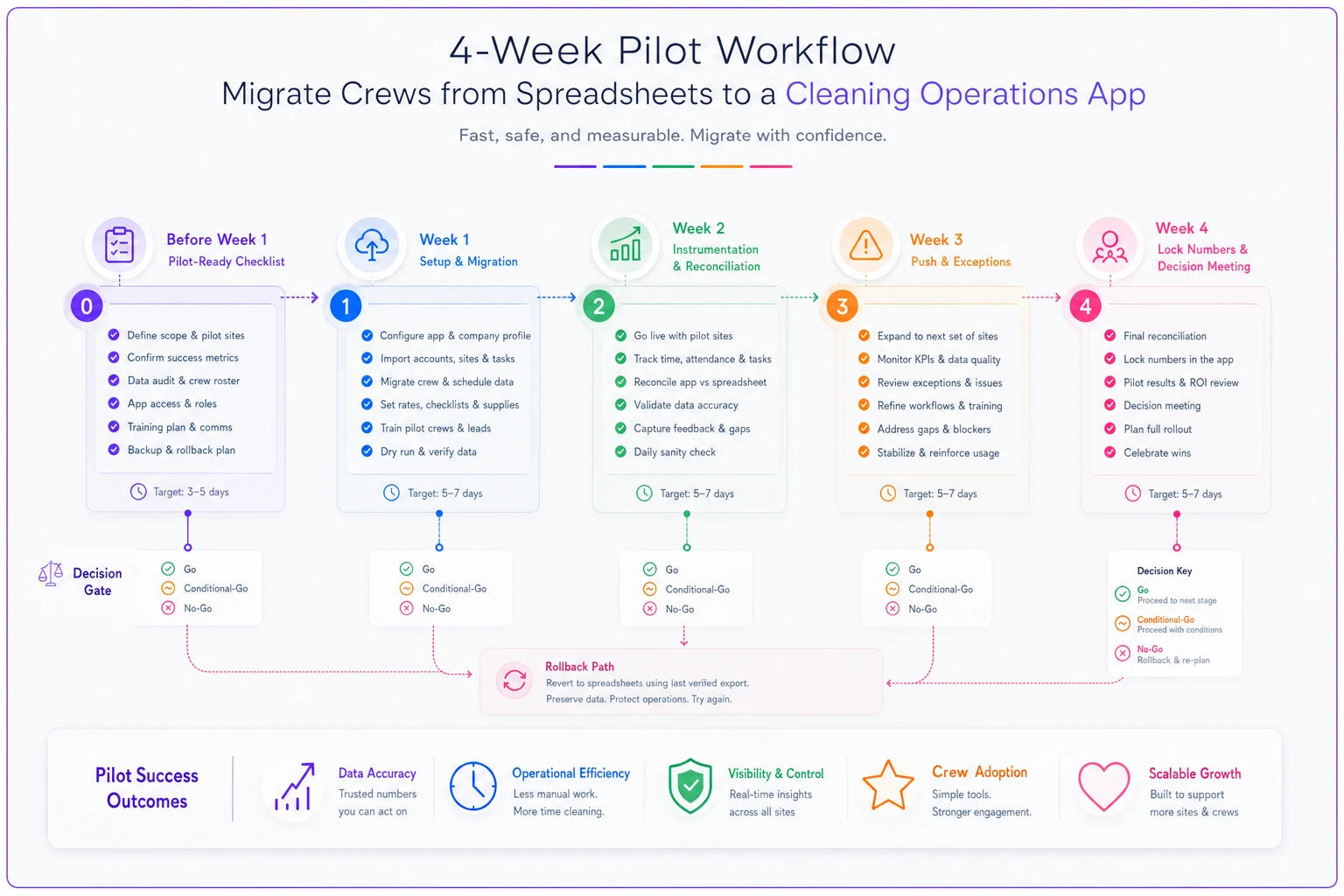
Here's a simple visual of the four‑week pilot flow if it helps your team align on the steps and decision gates.
Micro‑training script (Module 1: "Your shift in the app")
> "Three things today. One — when you get to site, open the app and tap Clock In. It knows where you are, so if it won't let you clock in, you're probably not close enough yet. > Two — your task list is the same stuff you already do. Tap each one when it's done. If it asks for a photo, that's your proof the work got done, so take it before you pack up. > Three — if something's wrong — supplies out, door locked, water damage — tap Raise Exception instead of texting me. It goes to the same place and I actually see it faster." Assessment items — have each crew lead physically do these, not just answer verbally:
-
Clock in and clock out successfully.
-
Complete one task that requires a photo.
-
Raise one test exception and confirm the supervisor received it.
-
Sync after being offline for two minutes.
If someone can't do all four unassisted, they get a five‑minute re‑run, not a pass.
Week 2: Instrumentation and the truth check
By now crews have the basics, so you shift focus from "can they use it" to "is it capturing what actually happens." This is the week the pilot gets honest.
Instrumentation plan
Your app should be emitting events. If you can't see these, you can't run a real pilot. At minimum, track:
``
shiftclockin, shiftclockout, taskassigned,
taskcompleted, evidenceuploaded, exceptionraised,
exceptionacknowledged, exceptionresolved
``
Each event needs a timestamp, a userid, a siteid, and a shift_id. Those four fields let you compute every KPI.
A sample query for daily shift adoption:
``sql
SELECT
shiftdate,
COUNT(DISTINCT CASE WHEN clockin IS NOT NULL
AND clockout IS NOT NULL THEN shiftid END) * 100.0
/ COUNT(DISTINCT scheduledshiftid) AS shiftadoptionpct
FROM shifts
WHERE shiftdate BETWEEN :start AND :end
GROUP BY shiftdate
ORDER BY shift_date;
``
And response lag:
``sql
SELECT
shiftdate,
PERCENTILECONT(0.5) WITHIN GROUP (
ORDER BY EXTRACT(EPOCH FROM (acknowledgedat - raisedat))/60
) AS medianresponselagmin
FROM exceptions
WHERE raisedat::time BETWEEN '06:00' AND '20:00'
GROUP BY shift_date;
``
Reconciliation steps (do this twice this week)
-
Export the app's completed‑shift list for the period.
-
Pull the same period from the parallel spreadsheet.
-
Join on
site_id + date. -
Flag three categories
in app but not spreadsheet (good — the app caught something), in spreadsheet but not app (bad — adoption gap), in both but different (investigate — usually a timing or naming mismatch).
The category that tells you the most is "in spreadsheet but not app." That's the list of shifts crews are still doing the old way. Sit with each crew lead and ask why for each one. The answers — "app was slow," "forgot," "no signal," "didn't trust it" — are your remediation list, and they're worth more than any dashboard number.
Week 3: Push to target and work the exceptions
Weeks 1 and 2 are about getting the plumbing working. Week 3 is about performance. The goal now is getting KPIs near target, which means systematically killing the reasons people revert to the spreadsheet.
Daily exception checklist
-
[ ] Any shifts yesterday with clock‑in but no clock‑out? (points to workflow confusion)
-
[ ] Any tasks marked complete without required evidence? (evidence discipline slipping)
-
[ ] Any exceptions open longer than the response‑lag floor?
-
[ ] Any crew below 70% adoption two days running? (needs a direct check‑in, not a group message)
-
[ ] Any sync failures or login issues reported?
-
[ ] Does yesterday's app shift count match the spreadsheet?
Severity classification for exceptions
| Severity | Definition | Response target | Owner |
|---|---|---|---|
| S1 — Critical | Safety, security, or client‑visible failure (flood, break‑in, missed SLA site) | ≤ 15 min | Ops Supervisor → Owner |
| S2 — Operational | Supplies out, access blocked, equipment down | ≤ 1 hour | Ops Supervisor |
| S3 — Quality | Task redo needed, evidence missing | Same day | Crew Lead |
| S4 — Minor/info | Note for next visit, small defect logged | Next shift | Crew Lead |
The common mistake is letting S3 and S4 pile up invisibly while everyone focuses on S1s. By end of week 3 your open S3/S4 backlog should be shrinking, not growing. If it's growing, crews are logging problems faster than anyone resolves them — and that erodes trust in the app quickly, because people stop believing anything they report actually gets handled.
Week 4: Lock the numbers and make the call
No new features, no new crews, no changes this week. You're measuring a stable system. Introducing anything new in week 4 contaminates your data — you'll never know if the result was the tool or the tweak.
Monday–Thursday — Run normal operations, collect clean KPI data, keep the daily exception checklist going.
Friday — Final reconciliation, compute the four‑week trend for each KPI, and hold the decision meeting.
Go / Conditional‑Go / No‑Go matrix
| Outcome | Criteria | Action | Timeline |
|---|---|---|---|
| GO | All three KPIs at or above target, reconciliation gap < 3% | Approve company‑wide rollout | Plan rollout within 2 weeks |
| CONDITIONAL‑GO | All KPIs at or above floor, at least one below target; reconciliation gap 3–8% | Fix named gaps, re‑test for 1–2 weeks | Remediation owner assigned, re‑measure before rollout |
| NO‑GO | Any KPI below floor, OR reconciliation gap > 8%, OR S1 exceptions mishandled | Halt rollout; root‑cause analysis | Decide within 1 week: re‑pilot, re‑scope, or drop tool |
Compare your week‑4 numbers — not the four‑week average — against your floors and targets. You want where you ended up, because week 1 noise shouldn't drag down a system that's now working.
Remediation ownership for Conditional‑Go
-
Low adoption on one crew → Ops Supervisor, 1 week, targeted re‑training + daily check‑in.
-
Evidence completion low → Crew Leads, 1 week, tighten which tasks require photos and clarify why.
-
Response lag high → Ops Supervisor, 1 week, fix notification settings or reassign triage during peak hours.
-
Reconciliation gap → Data/Admin, 1 week, trace whether it's a naming/ID issue or a genuine adoption hole.
Re‑measure for at least a week after remediation. A Conditional‑Go that rolls out without re‑testing is just a No‑Go you haven't admitted yet.
The rollback runbook (because sometimes you walk away)
A No‑Go isn't a disaster if you planned for it. The disaster is a No‑Go with no way back — you've already dismantled the spreadsheet and operations are in limbo.
Rollback steps, in order:
-
Announce the pause to pilot crews same day — plain language, no blame. "We're going back to the current process while we sort some things out." Crews that fear being blamed for a tool's failure stop reporting honestly, which poisons any future attempt.
-
Confirm the spreadsheet is current. Because you ran in parallel, it should be. Reconcile any last gaps.
-
Export all pilot data from the app before any subscription downgrade — your exception logs and completion history are valuable even if the tool isn't.
-
Document the actual failure reasons while they're fresh. Not "crews didn't adopt" but "crews with older Android phones hit sync failures on about 30% of shifts." Specifics are what make a second attempt succeed.
-
Decide the path re‑pilot with a different scope, renegotiate with the vendor, or test a different tool. Set that decision date within a week.
Keeping the spreadsheet alive through the whole pilot is what makes rollback a non‑event instead of a crisis. That dual‑entry pain in weeks 1–4 is literally your insurance policy.
Hardware and security notes people skip
A few things that quietly sink pilots and have nothing to do with the software itself:
-
Test on the worst phone on the team, not the best. The pilot stands or falls on the device the newest cleaner is holding.
-
Offline behavior is non‑negotiable. Confirm queued data survives a dead zone and a force‑close. A surprising number of "adoption problems" turn out to be sync problems the crew got blamed for.
-
Set role‑based access from day one. A crew lead sees their sites; a cleaner sees their tasks; nobody sees the full client list. Fixing permissions after rollout is far messier than setting them during a four‑crew pilot.
-
Decide who owns offboarding access. When a cleaner leaves mid‑pilot, their login should die that day. Write down who handles it.
-
Confirm where client data lives and that it meets whatever your sensitive accounts require — healthcare and some corporate sites have real contractual constraints on photos and access logs.
These aren't afterthoughts. They're the kind of things that surface in week three when you're already behind on reconciliation and don't have time to deal with them.
A worked ROI calculation
Numbers make the Go/No‑Go defensible to whoever signs the check. Here's a realistic frame for a mid‑sized operation running the pilot math out to annual savings.
-
Supervisor admin time dropped from roughly 90 min/day of chasing texts and updating the spreadsheet to about 35 min/day. Call it ~55 min saved per supervisor per day. Across 4 supervisors at ~$28/hr, over ~250 working days, that's close to $25k–$26k/year.
-
Rework from missed tasks evidence‑backed completion cut redo visits. If you were losing roughly 6–8 redo visits a month at ~$120 loaded cost each, cutting that in half saves somewhere around $4k–$6k/year.
-
SLA credits avoided faster response lag meant two fewer client credits over the pilot window. Even conservatively that scales to $3k–$8k/year depending on your contract penalties.
Rough annual benefit: ~$32k–$40k. Against a subscription of, say, $900–$1,200/month (~$11k–$14k/year) plus setup time, payback lands somewhere in the 4–6 month range.
Two honest caveats. First, the admin‑time savings are only real if that freed time gets redeployed to billable supervision or more accounts — not absorbed into longer coffee breaks. Second, these are pilot‑derived estimates. The whole point of the four‑week structure is that your numbers come from your crews, not from a vendor's slide deck.
A real scenario
A commercial janitorial outfit running about 14 crews across two cities had bought an ops app, "rolled it out" to everyone at once, and six weeks later had maybe 40% adoption with a master spreadsheet that was still the real source of truth. They almost cancelled.
Instead they ran a contained four‑week pilot with 4 crews and one supervisor, spreadsheet in parallel. Week 1 adoption was rough — around 55% — mostly because two crews had old phones with constant sync failures, which the reconciliation caught immediately. They swapped the phones, re‑ran the 15‑minute training, and by week 4 shift adoption was near 94%, task completion with photos was around 89%, and median response lag dropped from "whenever the supervisor saw the text" to under 15 minutes. Reconciliation gap closed to about 2%.
That cleared a Go. The difference wasn't the software — it was the same software they'd nearly cancelled. The difference was a structured pilot that surfaced the real problem (phones and sync, not lazy crews) and measured against pre‑set numbers instead of gut feel.
When this makes sense — and when it doesn't
Run this pilot when you've got real spreadsheet pain, 5+ crews, and a supervisor who can own daily triage for four weeks. It's also the right move when a previous rollout flopped and you need to prove — with numbers — whether the tool or the process was the problem.
Skip the formal pilot when you're running 1–2 crews and can just switch. At that scale the parallel‑entry overhead costs more than it's worth; you'll know within a week by feel.
Don't attempt this if nobody can own reconciliation. Without that, you'll finish four weeks with two sources of truth and no verdict — which is worse than not piloting at all, because now you've spent the effort and still can't decide.
The whole value of a four‑week pilot cleaning operations app rollout is that it turns "I think the crews like it" into "adoption's at 94%, lag's under 15 minutes, reconciliation gap's 2% — we go." That sentence is what gets a tool adopted company‑wide without the quiet death that kills most migrations. Set the numbers first, keep the spreadsheet alive as your safety net, and let the four weeks tell you the truth.
Ready to simplify your cleaning operations?
Join 1,000+ cleaning businesses using Wipyly to save time, reduce scheduling conflicts, and enhance client satisfaction.