


About eighteen months ago, I watched a 40-crew cleaning company completely botch their software migration. They bought enterprise-level scheduling software, trained everyone on a Friday afternoon, and went live Monday morning. By Wednesday, crews were showing up at the wrong buildings, dispatch couldn't track anyone, and the owner was back on spreadsheets while still paying for the new system.
Why most cleaning software migrations go sideways before they even start
The damage went deeper than wasted money. Crew leads who'd been around for years felt incompetent because they couldn't navigate the new tablets. Office staff started bypassing the system entirely, texting jobs directly to crews. Client complaints tripled that week. Three months later, they were still untangling data inconsistencies from that failed cutover.
This happens constantly in cleaning operations. Not because the software is bad or the crews can't learn — but because nobody builds a real migration playbook that accounts for how cleaning businesses actually work.
Why cleaning crew migrations fail differently than other industries
Cleaning businesses face migration challenges most software vendors genuinely don't understand. Your crews operate independently across dozens of sites. They're not sitting at desks where someone can walk over and help. Many have limited tech experience and even less patience for systems that slow them down mid-job.
Stop losing bookings in operational chaos.
Wipyly helps you manage, confirm, and optimize every cleaning appointment efficiently.
- Centralized booking management
- Automated client notifications
- Staff scheduling & route optimization
No credit card required
The typical migration advice — "run both systems in parallel for a month" — doesn't work when your dispatcher is already juggling 200 daily assignments. Neither does the overnight cutover. Cleaning operations need something different.
Most failures follow predictable patterns. The owner picks software based on demo features that don't match actual workflows. They underestimate how long crews need to build new habits. They don't plan for the chaos when half the team uses the new system while the other half sticks to the old way. And they definitely don't build governance rules to prevent people from reverting to WhatsApp groups and paper schedules when things get difficult.
A proper cleaning software migration playbook isn't really about technology. It's about managing change across distributed teams who are already stretched thin, have varying tech comfort levels, and cannot afford operational disruptions that cost clients.
Pre-migration audit: mapping what actually happens vs what you think happens
Before touching any new software, document how work actually flows through your operation. Not the official process in your operations manual — the real process happening at 6 AM when crews are loading vans.
Shadow dispatch for three full days. Track every communication channel they use. You'll probably find they're using the scheduling software for basic assignments, WhatsApp for last-minute changes, phone calls for emergencies, and a notebook for everything else. Each of those channels represents a workflow that needs mapping into your new system.
Document your current data accuracy too. Pull last month's schedules and compare them to actual completion records. How many jobs were rescheduled? How many addresses were wrong? How many crew assignments changed day-of? These gaps show where the new system needs the most governance.
Map your exception handling. What happens when a crew lead calls in sick? When a client adds tasks on-site? When equipment breaks mid-route? Your current workarounds — even the messy ones — contain real operational knowledge that needs preserving.
Track time delays in your current process: how long between a client request and dispatch awareness, between assignment and crew acknowledgment, between job completion and office knowledge. These baseline numbers let you actually prove whether the new system improves anything.
-
Communication flow map showing every channel, frequency, and failure point
-
Data accuracy baseline with specific error rates and their causes
-
Exception catalog listing every workaround your team currently uses
Without this audit, you're migrating blindly and hoping the new software magically fixes problems you haven't properly identified.
Phased pilot structure that doesn't break daily operations
The smartest approach uses overlapping pilots that gradually expand without risking core operations. You can't shut down for training. You can't have half your crews confused while serving commercial contracts. You need a structure that maintains service quality while building competence.
Phase 1: Back-office foundation (2 weeks)
Start with office staff only. Migrate your client database, service locations, and standard job templates. Let dispatch get comfortable with the interface while crews continue their normal routine. This phase catches data structure problems before they affect field operations.
During these two weeks, run shadow schedules. Build tomorrow's schedule in both systems but only communicate through the old one. Compare outputs. You'll find mismatches in travel time calculations, job duration estimates, and crew capacity that need fixing before crews ever touch the system.
Phase 2: Single crew pilot (2 weeks)
Pick your most tech-comfortable crew lead and their team — usually someone already using apps personally, comfortable with change, and respected by other crews. They run exclusively on the new system while everyone else continues normally.
This crew becomes your feedback engine. They'll surface the real problems: login issues in basements with no signal, interface elements too small for gloved hands, missing fields for special client instructions. Fix these before expanding.
Phase 3: Route-based expansion (3 weeks)
Add one complete route or geographic zone, typically 3–4 crews serving related clients. This tests handoff workflows, coverage for absences, and multi-crew coordination. Keep other routes on the old system.
The route-based approach maintains clear boundaries. Crews know whether they're on the new system or the old one for the week. Dispatch can focus support on one group. Clients in that zone get consistent service from fully trained crews.
Phase 4: Gradual remaining rollout (2–3 weeks)
Add remaining crews in groups of five, every three to four days. By now, experienced crews can peer-train newcomers. Your exception handling is tested. Dispatch knows the workarounds.
Never migrate everyone in the final wave. Keep roughly 20% of crews for last to catch issues that only appear at full scale — system slowdowns, reporting bottlenecks, or integration failures that weren't visible in smaller pilots.
This eight-week migration seems slow but prevents the catastrophic failures that force complete rollbacks. Each phase validates the next, building organizational confidence instead of eroding it.
Phased migration overview
Visual workflow of the phased migration is shown below.
[Pre-Migration Audit] ↓ [Phase 1: Back-Office Foundation — 2 weeks] ↓ [Phase 2: Single Crew Pilot — 2 weeks] ↓ [Phase 3: Route-Based Expansion — 3 weeks] ↓ [Phase 4: Gradual Full Rollout — 2–3 weeks] ↓ [Post Go-Live: Continuous Optimization]
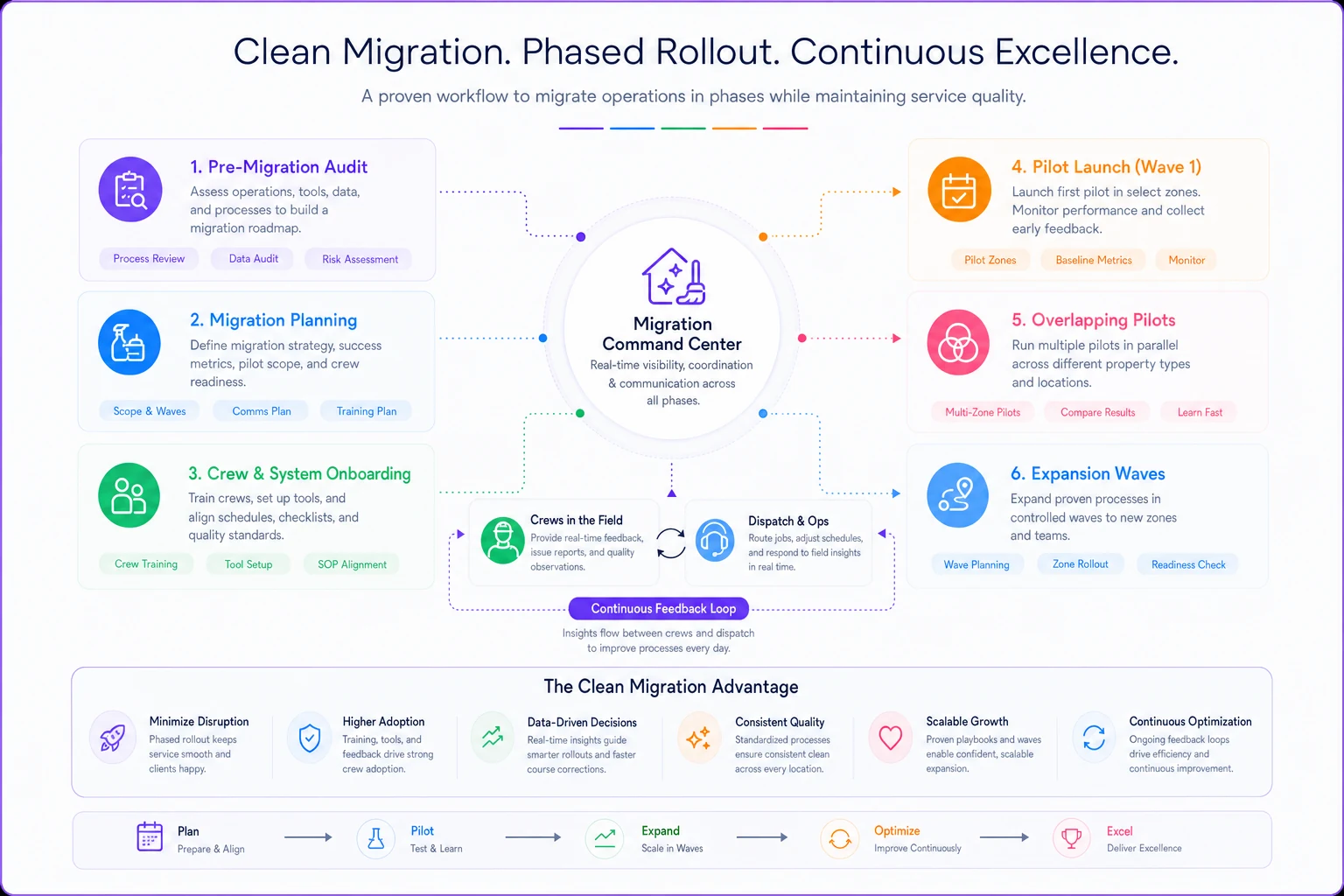
Use this flow as a checklist when planning pilots and expansions.
Micro-training modules designed for 6 AM van loading
Cleaning crews don't learn software in conference rooms. They learn in parking lots before dawn, during lunch breaks in their vans, and in the five minutes between jobs. Training needs to match that reality.
Build 5-minute micro-training modules that each cover exactly one task. Not "how to use the scheduling system" — more like "how to check tomorrow's route" or "how to report a missing keycode." Each module should be completable while sitting in a van with a sandwich.
-
Problem scenario (30 seconds)
-
Step-by-step solution (2 minutes)
-
Practice task (2 minutes)
-
Quick reference card (30 seconds)
Create modules for situations crews actually face:
Module: "Client Added Extra Bathroom" Shows exactly how to add unexpected tasks on-site, update the invoice, and notify dispatch. Includes what to do if the app won't sync.
Module: "Van Broke Down Mid-Route" Covers marking remaining jobs for reassignment, notifying dispatch of location, and helping another crew access your client notes.
Module: "Wrong Address in System" Teaches how to update location info, add door codes or parking instructions, and flag for office verification.
Record modules on actual phones, not polished studio screens. Show what happens when Wi-Fi drops, when buttons don't respond immediately, when wrong data appears. Crews need to see that problems are normal and manageable — not signs the whole thing is broken.
Deliver modules through WhatsApp or whatever messaging app crews already check. Don't make them log into a training portal. Send one module every other day during their pilot phase. A thumbs up or "done" reply as the completion confirmation is enough.
Deliver modules via the same messaging app crews already use and accept a thumbs-up as completion confirmation.
Pay crews for training time. Five-minute modules watched during a commute still count as work. Track completion rates by crew rather than individually to encourage peer support.
Adoption metrics that actually predict success
Most companies track the wrong things during migration. Login counts and feature usage don't tell you if anything is improving. You need operational indicators that show whether the new system is changing how work gets done.
Response lag reduction Measure the time between dispatch creating an assignment and crew acknowledgment. In the old system, this might average 35 minutes through various channels. The new system should bring that under 10 minutes. If it doesn't, crews aren't really using it.
Schedule deviation rate Compare planned vs actual arrival times. Good adoption means crews follow system-generated routes instead of their preferred patterns. Deviation rates should drop from around 40% to below 15% as crews start trusting the optimization.
Cross-crew communication frequency Count how often crews communicate through the system vs external channels for coverage, supplies, or client issues. Rising system usage means they trust it for operational needs, not just receiving assignments.
Data self-correction rate Track how often crews fix incorrect client info, update access instructions, or adjust job durations on their own. Rising correction rates mean they're taking ownership of data quality rather than working around bad information.
Escalation patterns Monitor what issues crews try solving in-system vs immediately calling dispatch. Successful adoption looks like crews attempting system solutions first and only escalating true exceptions.
| Metric | Target | Warning Sign |
|---|---|---|
| Response lag | Under 10 minutes | Still above 25 minutes by week 4 |
| Schedule deviation rate | Below 15% | Not declining after route expansion |
| System communication share | Above 60% | Crews still defaulting to WhatsApp |
| Data corrections per crew | 5+ per week | Zero suggests disengagement |
| Phone escalations to dispatch | Decreasing monthly | Flat or rising after go-live |
Share this with crew leads weekly, not daily. Show trends, not snapshots. Celebrate specific improvements rather than demanding perfect scores across everything.
When metrics stall, investigate why. Usually it's a training gap (crews don't know how) or a trust gap (crews don't believe the system helps). Both are fixable if caught early.
Governance rules that prevent shadow systems
The biggest threat to your migration isn't technical failure — it's shadow systems. The moment things get difficult, someone creates a WhatsApp group for "quick updates" or a spreadsheet for "temporary tracking." Six months later, half your operations run outside the system you paid for.
Build governance rules before migration starts.
Channel exclusivity rules Define exactly what communication belongs where. Schedule changes only through the system. Emergency contact through phone calls, logged in-system afterward. No operational communication in personal messaging apps.
Give each rule a specific operational consequence, not a punishment. "Schedule changes via text won't be covered if a client complains" is more effective than any written policy.
Data single-source requirements Client information lives only in the system. No separate contact lists, door codes saved in personal phones, or special instructions scribbled in notebooks. Make the system the only place to find operational data, then enforce that by removing the alternatives — stop printing client lists, disable old shared spreadsheets.
Exception approval chains Some situations legitimately require working outside the system. Define who can approve exceptions and how they get documented. Dispatch can authorize verbal schedule changes during outages but must enter them within 24 hours. Create an exception log reviewed weekly — patterns reveal either training gaps or system limitations that need addressing.
Performance visibility requirements Make system usage part of crew performance reviews. Not as surveillance, but as operational excellence. Crews who maintain accurate data, respond quickly, and help peers should be recognized.
Publish weekly adoption metrics showing positive indicators — fastest response times, most client info updates, best route compliance. Avoid shame-based tracking that makes people hide mistakes rather than report them.
Rollback triggers Define exactly what would trigger reverting to old processes. System downtime over 4 hours? Data corruption affecting more than 20 clients? Error rates above 30%? Clear triggers prevent panic reversions during minor issues.
More importantly, define recovery procedures. How do you resume system usage after a temporary reversion? Who verifies data synchronization? What stops people from just staying in the comfortable old way?
The governance structure needs teeth but not terror. Crews should understand that using the system correctly makes their jobs easier and protects them when issues occur. The rules exist to prevent chaos, not create bureaucracy.
ROI protection through continuous optimization
A successful migration doesn't end at go-live. The real ROI comes from continuous improvement based on actual usage patterns. Most cleaning companies never reach full value because they stop optimizing once basic functions work.
Monthly workflow audits Every month, pick one workflow and trace it completely through the system. Follow a special request from client call through completion and billing. You'll find unnecessary steps, data gaps, and automation opportunities that weren't visible during setup.
Look for copy-paste patterns where staff manually move information between screens. These are easy automation targets. If dispatch copies addresses into route planners, build a direct integration. If billing re-enters job completions, automate the flow.
Quarterly crew feedback sessions Gather a few crew leads each quarter to discuss system friction. Not a complaint session — a working group to identify specific problems and test solutions. Crew leads who help improve the system become champions for continued adoption.
Focus on small, implementable fixes: larger buttons for gloved hands, auto-populating yesterday's supply usage, simplified exception reporting. Incremental improvements maintain engagement better than promises of future overhauls.
Usage pattern analysis Your system tracks user behavior. Analyze it monthly. Which features get ignored? Where do people spend too much time? What sequences suggest confusion?
If crews spend three minutes finding client notes that should take 30 seconds, you have a navigation problem. If certain reports never get generated, question whether you need them at all.
Integration opportunity mapping List every remaining manual data transfer — timesheet to payroll, completion reports to billing, supply usage to purchasing. Each one is ROI sitting untapped. Prioritize by time saved and error reduction, not just convenience.
Cost-per-outcome tracking Calculate real per-job system costs including software, hardware, training, and support time. Compare to old process costs. Initially the new system might cost more — the question is whether it's declining month over month.
| Metric | What It Tells You |
|---|---|
| Software cost per job completed | Whether unit economics are improving |
| Support hours per 100 jobs | Whether crews are becoming self-sufficient |
| Error remediation time per week | Whether data quality is getting better |
| Client complaint rate | Whether service delivery is stabilizing |
ROI protection means proving value continuously, not just at purchase. When renewal comes, you need clear evidence that the system pays for itself through efficiency, error reduction, and scaling capability.
The hidden change management costs nobody calculates
Every cleaning software migration playbook underestimates human costs. Not training time — the deeper costs of disrupting established workflows, straining team relationships, and burning management attention during the transition.
Crew confidence degradation Experienced cleaners who've managed routes for years suddenly feel incompetent with new technology. That confidence hit affects more than system usage. They might become hesitant in client interactions, less willing to train new hires, or more likely to start looking elsewhere. Budget for confidence rebuilding. Celebrate small wins publicly. Pair tech-savvy younger crew members with veterans — trade system help for operational mentoring.
Dispatch burnout during dual operations Running shadow schedules, supporting confused crews, and maintaining service quality simultaneously exhausts dispatch staff. They're learning new systems while preventing operational collapse. Most companies don't account for this. Plan coverage redundancy, reduce non-critical admin work during migration, and accept that dispatch mistakes will increase temporarily. Build buffers accordingly.
Client relationship strain Even smooth migrations cause client-visible hiccups. Crews arrive late during route optimization adjustments. New staff miss special instructions during handoffs. Response times lag while teams learn new communication features.
Proactively communicate with key clients about the system upgrade. Frame minor disruptions as investments in better service. Have account managers ready to respond to complaints quickly and personally.
Management decision fatigue Every day brings dozens of micro-decisions: should this exception become a rule, is this workaround acceptable temporarily, when do you force compliance vs allow flexibility? This constant deciding exhausts leadership when they need energy for everything else.
Document decisions daily in a simple log. Review weekly to find patterns and build policies. Delegate specific decision types to operational managers. Preserve owner and executive attention for true strategic issues.
These hidden costs make migrations take longer and cost more than expected. Acknowledging them upfront lets you budget appropriately, set realistic timelines, and keep team morale intact through the transition.
Building your migration calendar with reality buffers
Most cleaning companies build migration calendars based on vendor promises. "Four weeks to full deployment!" Then a crew gets the flu, a big contract demands attention, and the system has limitations nobody mentioned in the demo. The four-week migration stretches into four months of chaos.
Build buffers into every phase:
-
Foundation phase — Plan for 2 weeks, budget for 3. Data cleanup almost always takes longer than expected. Your client database has duplicates, missing information, and outdated details nobody noticed until migration forced a close look.
-
Pilot crew phase — Plan for 2 weeks, budget for 4. Your chosen crew lead gets pulled into emergency coverage. Tablets arrive late. An integration doesn't work as promised.
-
Route expansion phase — Plan for 3 weeks, budget for 5. The first route reveals workflow gaps you couldn't predict. Fixing them properly takes time. Rushing creates permanent workarounds that limit future value.
-
Full rollout phase — Plan for 2 weeks, budget for 6. The final 20% takes roughly 50% of the effort. Edge cases emerge. Resistance pockets need attention. Seasonal scheduling patterns complicate adoption in ways that are hard to predict in advance.
Your calendar should include specific trigger points — what stops migration temporarily, what allows faster progress, and what forces a complete reset. Map migration phases against your business cycles too. Don't migrate during end-of-quarter deep cleans, holiday scheduling, or contract renewal periods. Your teams have limited change capacity.
The realistic timeline might seem discouraging, but it prevents the crisis-driven migrations that actually destroy ROI. Better to plan for 14 weeks and finish in 12 than promise 4 weeks and spiral into six months of problems.
Protecting long-term value beyond go-live
The difference between cleaning companies that get real ROI from software and those that waste money isn't the technology — it's the migration and adoption process. A proper cleaning software migration playbook doesn't end at go-live. It extends through the first year of operations, constantly adjusting based on real usage.
Your crews will find creative ways to use features you didn't expect. They'll also find creative ways to avoid features you thought were essential. Both teach you something about your actual operations versus your theoretical workflows.
The governance rules will need adjustment. Some will be too strict and drive underground workarounds. Others will be too loose and allow chaos. Monthly refinement based on operational reality keeps the system valuable over time.
A well-run migration also builds organizational capability for future changes. Crews who successfully adopt one system gain confidence for the next. Dispatch who manages one transition develops skills for ongoing optimization. Management who navigates migration complexity understands operational change at a deeper level — which pays dividends far beyond any single software rollout.
The failed migration described at the start of this article? That company eventually succeeded — after bringing in outside help, rebuilding crew confidence, and essentially starting over with a proper playbook. It took nine months and probably cost triple the software price in lost productivity and remediation.
Your migration doesn't have to follow that path. Build the playbook upfront. Respect the complexity. Protect the ROI. The software is just technology — the migration is what makes it valuable.
Your migration doesn't have to follow that path. Build the playbook upfront. Respect the complexity. Protect the ROI. The software is just technology — the migration is what makes it valuable.
Ready to simplify your cleaning operations?
Join 1,000+ cleaning businesses using Wipyly to save time, reduce scheduling conflicts, and enhance client satisfaction.