


Most cleaning companies find out they're losing an account on the day the client emails to cancel. By then the decision is already made — usually made weeks earlier, quietly, after a handful of missed details nobody flagged. The cancellation isn't the event. It's the receipt.
That's the core problem with how most cleaning operators think about retention. They treat customer success as damage control that kicks in when someone complains. But complaints are lagging indicators. The client who complains is often the healthy one — they still care enough to tell you. The dangerous accounts go silent, stop responding to your quality surveys, and start comparing quotes on the side.
A real customer success playbook for a cleaning business isn't about being nicer to clients. It's a system that reads operational data as relationship data, catches decay early, runs a defined recovery sequence, and ties renewals and expansion to things you can actually measure. And the reason it matters more as you grow: at 8 accounts you can feel when something's off. At 80, that feeling disappears and you're flying blind unless the signals are built into your workflow.
Why churn hides inside your ops data
Your cleaning quality can stay technically fine while the account quietly rots. The relationship dies through a hundred small friction points that never show up in a QA score.
A site gets serviced on time, the floors look good, the QA checklist passes — and the client still leaves. Why? Because the office manager had to email you three times last month about the trash not getting emptied in the east wing, and each time it took two days to get a response. The cleaning was fine. The experience of being a client was exhausting.
Churn is rarely about the actual cleaning. It's about accumulated friction:
-
Slow response to messages
-
Repeated small misses that force the client to become your quality inspector
-
Turnover on their site (new cleaner every few weeks, no continuity)
-
Invoicing surprises or disputes that never fully got resolved
-
The main contact changing on the client side and nobody re-establishing the relationship
Each of these leaves a fingerprint somewhere in your operations. The problem is those fingerprints are scattered — response times live in email, misses live in your QA logs, turnover lives in your scheduling, disputes live in your billing. Nobody's looking at them together, so nobody sees the pattern forming.
The signals that actually predict cancellation
Not all warning signs carry equal weight. Over time you start to notice which ones actually correlate with an account walking versus which ones are just noise. Here's a breakdown of the signals worth building into your system, ranked by how loudly they predict trouble.
Stop losing bookings in operational chaos.
Wipyly helps you manage, confirm, and optimize every cleaning appointment efficiently.
- Centralized booking management
- Automated client notifications
- Staff scheduling & route optimization
No credit card required
| Signal | What it looks like | Predictive weight | Where it hides |
|---|---|---|---|
| Contact goes quiet | Stops replying to check-ins, skips QA surveys | High | Email / messaging |
| Repeat complaint, same issue | Same miss flagged 2–3 times in 60 days | High | QA logs |
| Crew turnover on-site | 3+ different cleaners in a quarter | Medium-High | Scheduling |
| Payment slowdown | Invoices going 15–30 days past their usual pattern | Medium-High | Billing / AR |
| Contact change | New facility manager, no re-onboarding | Medium | CRM notes |
| Scope shrinkage | Client trims add-ons or reduces frequency | Medium | Contract / invoicing |
| Silence after a complaint | They complained, you fixed it, then nothing | High | Follow-up gap |
That last one is the sneaky killer. A client complains, you scramble, you fix it — and then everyone moves on. But the client is now watching. If the next month goes smoothly they relax. If anything slips at all, they've already got proof in their head that you're unreliable. The recovery window after a complaint is where accounts are actually won or lost, and most operators treat it as "problem closed."
The pattern worth internalizing: a single strong signal is a yellow flag. Two overlapping signals — say, a quiet contact plus a repeat complaint — that's a red flag that should trigger an actual recovery play, not a mental note.
Building the recovery flow
When an account trips into red-flag territory, improvisation is your enemy. The owner who "handles it personally" doesn't scale, and the response quality depends entirely on their mood that day. What works is a defined recovery sequence that anyone on your team can execute.
-
Acknowledge within the day. The moment a red flag trips, someone reaches out personally — not a survey, not an automated note. A short, human message: "I noticed a couple things slipped this month and I want to make it right." Speed here matters more than polish.
-
Diagnose before you defend. Get on a call or visit the site. Ask what's actually bothering them, not just the surface complaint. Half the time the stated issue isn't the real one. The trash complaint is really "I feel like I have to babysit you."
-
Commit to something specific and small. Don't over-promise a total overhaul. Pick one or two concrete, visible fixes with a date. "Same cleaner every visit for the next month" beats "we'll improve communication."
-
Over-deliver the next 30 days. This is the proof window. Extra QA checks, a mid-month photo update, a quick call to confirm things are good. You're rebuilding trust with evidence, not words.
-
Close the loop out loud. At the 30-day mark, reach back
"Here's what we changed, here's how it's looking — are we back on track?" Getting them to verbally confirm resets the relationship psychologically.
The mistake operators make is running steps 1 through 3 and skipping 4 and 5. They fix the immediate fire and assume it's resolved. But recovery isn't the fix — it's the demonstrated consistency after the fix. An account you "saved" that you never followed up on is still on borrowed time.
A quick visual of the recovery steps helps teams follow the sequence.
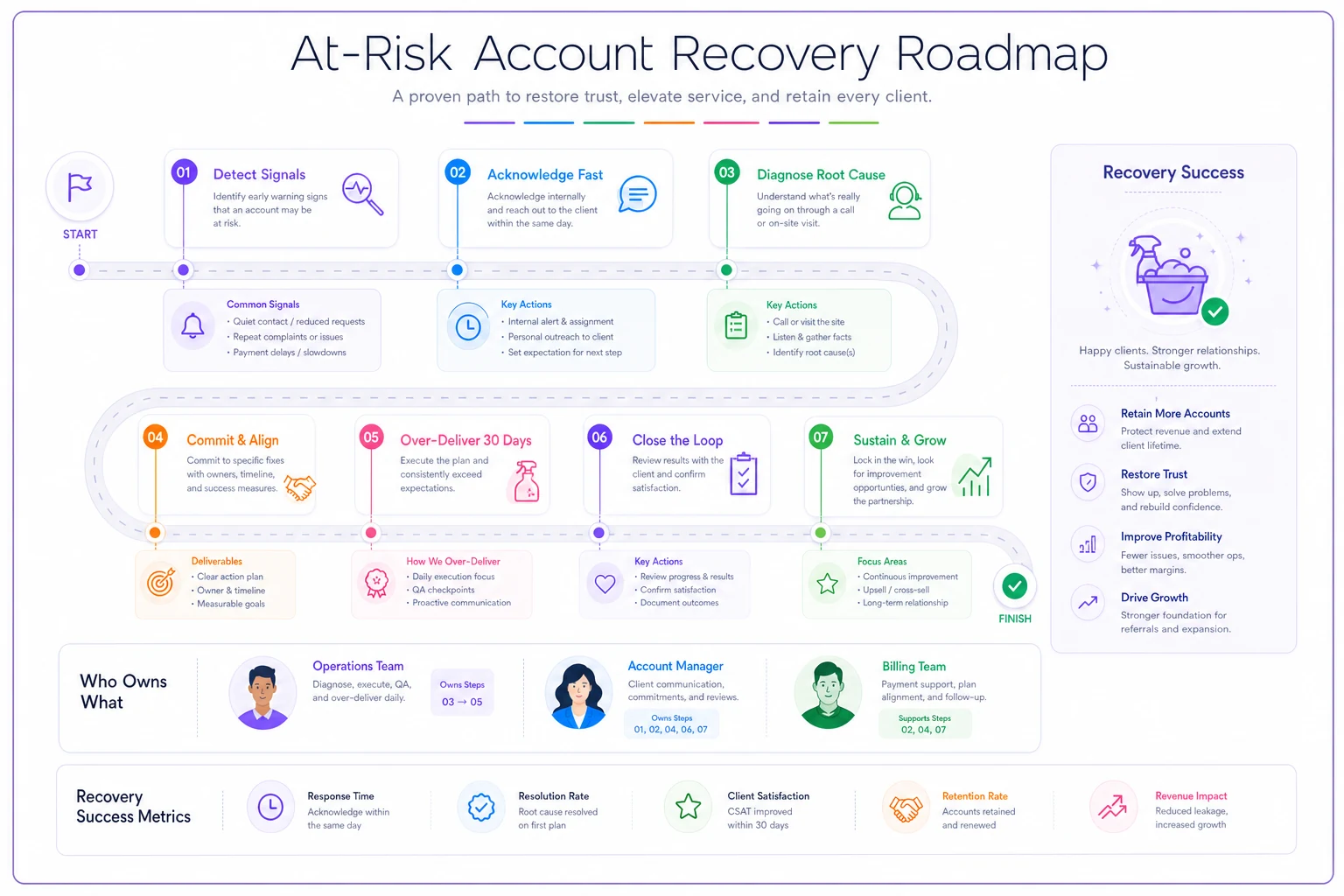
Log each recovery play in the client file so any team member can pick up and continue the sequence.
This whole flow works best when it plugs into a clear operational client lifecycle, because recovery isn't a separate process — it's a lifecycle stage with its own handoffs and triggers.
What changes when you go from 10 accounts to 50
At small scale, customer success is just the owner caring. You know every client, you can feel when Mrs. Alvarez sounds off on the phone, and you fix things because losing one account genuinely hurts.
That instinct doesn't transfer. When you hit 40 or 50 accounts spread across multiple crews and area managers, three things break at once:
Visibility breaks. No single person is close enough to every account to feel the drift. The signals are still there, but they're distributed across people who each only see their slice.
Consistency breaks. One area manager runs great recovery instincts, another lets accounts slide. Your retention becomes a function of who is managing the account rather than how you manage accounts.
Memory breaks. At 10 accounts you remember that this client had a rough patch in spring. At 50, that history lives in someone's head who might not be in the room when the renewal comes up.
The fix isn't hiring a "customer success manager" and hoping for the best. It's making the signals visible in a shared system so that account health is something anyone can look at, not a feeling one person carries around. This is where operational software that centralizes QA data, response times, and billing status actually earns its keep — not because software cares about your clients, but because it puts the fingerprints in one place so a human can act before it's too late.
Renewals: stop treating them as a date on the calendar
The worst way to handle renewals is to notice the contract's ending, panic, and send a "hey, want to renew?" email 30 days out. That approach hands all the leverage to the client and turns renewal into a price negotiation you're starting from behind.
Renewals should be earned continuously and triggered by health, not by the calendar. If you've been tracking account health, you already know which renewals are safe, which need work, and which you might not even want to keep.
-
Green accounts (healthy, on-time payment, low complaints) Approach 90 days out from a position of strength. This is where you introduce a modest price adjustment and possibly an expansion conversation. They're happy — this is the window to grow the account, not just hold it.
-
Yellow accounts (some friction, recoverable) Run the recovery flow before you ever mention renewal. Fix the relationship first. Renewing a shaky account without repairing it just locks in a client who'll leave mid-contract or fight every invoice.
-
Red accounts (chronic issues, thin margin) This is a decide-to-keep moment, not an auto-renew. Some accounts aren't worth keeping at the current price. Knowing which ones is a lot easier when you've run the numbers on account-level profitability and know exactly what each client actually contributes.
A renewal conversation that consistently works starts with reminding them of the value delivered — not "we've cleaned your building for a year" but specifics: "Over the last year we handled X, resolved Y within your SLA, and here's your quality trend." Anchoring on delivered value before you talk price completely changes the tone of the conversation.
Tying expansion to operational reality
Expansion is where customer success actually makes money, but it's also where cleaning companies most commonly shoot themselves in the foot. They upsell an account into more scope than their operation can handle, delivery quality drops, and now they've turned a healthy account into an at-risk one.
Before you pitch more services to an account, the account should already be green — consistent quality scores, clean payment history, a stable crew, and enough route capacity to absorb the extra work without straining everything else.
-
Account has been green for at least two consecutive months
-
QA scores are stable or improving, not just "passing"
-
The client has recently given positive feedback or referred someone
-
Your crew and route capacity can absorb the added scope without overtime chaos
-
Payment history is clean — you're not expanding an account that already drags on collections
-
The relationship has an active, engaged contact (not a quiet one)
If any of those are off, you're expanding on a shaky foundation. The most common failure is pushing add-ons to a client who's paying fine but whose delivery is already stretched thin — you take the extra revenue and immediately can't deliver on it, and now you've manufactured churn.
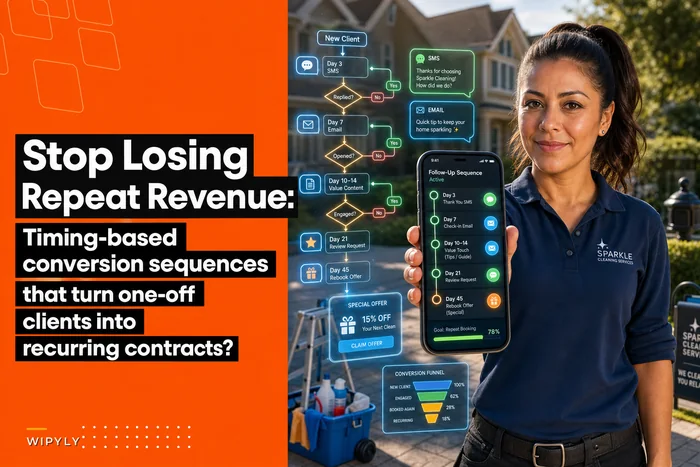
Expansion also connects directly to how you convert and grow recurring relationships in the first place. A lot of the same logic that turns one-off jobs into contracts applies here — the timing-based sequences for converting clients into recurring revenue share the same DNA: expand when the signals say the relationship is ready, not when your revenue target says you need it.
When a full customer-success system makes sense (and when it doesn't)
This isn't for everyone at every stage. If you're running 6 accounts and you personally talk to every client, building formal health scoring and recovery flows is overkill. Your instinct is faster than any system right now. Spend that energy on delivery.
The system starts paying off somewhere around the point where you can no longer name every account's current mood off the top of your head — usually somewhere between 25 and 40 accounts, or whenever you've added a layer of management between you and the client. That's when signals start slipping through cracks and a structured approach beats vibes.
And it's genuinely a bad idea if your underlying delivery is broken. No recovery flow saves an account that's getting bad cleaning every week. Customer success amplifies a solid operation — it doesn't compensate for a weak one. Fix the delivery first, then build the system around it.
A real scenario
Consider a mid-sized commercial cleaner running around 45 recurring accounts — mostly small-to-medium offices and a couple of medical clinics. They were losing roughly 3 to 4 accounts a quarter, and every loss felt like it came out of nowhere. Revenue looked fine on paper but the constant churn meant the sales side was just replacing what leaked out the back.
When they pulled their last year of lost accounts and looked backward, a pattern jumped out: nearly every canceled account had gone quiet for 30-plus days before leaving, and most had at least one unresolved repeat complaint in their history. The signals had been sitting in their QA logs and inboxes the whole time.
They built a simple health check — a monthly review flagging any account that was quiet, had a repeat issue, or showed a payment slowdown. Flagged accounts got the recovery flow. Nothing fancy, just consistent. Over the next couple of quarters, churn dropped to about 1 to 2 accounts a quarter, and a few of the accounts they chose to let go were low-margin ones they were better off without anyway. The bigger shift was cultural: their area managers stopped being surprised by cancellations, because the at-risk list was sitting in front of them every month.
The takeaway
Retention in a cleaning business isn't a personality trait or a customer-service department — it's an operational system that reads the data you already generate and acts on it before a client's mind is made up. The accounts you lose are almost never lost on the day they cancel. They're lost in the quiet weeks nobody was watching, through friction nobody logged, during recovery windows nobody followed up on.
Build the signals into your workflow, define the recovery plays so they don't depend on one person's instincts, tie renewals and expansion to real account health instead of the calendar, and you stop being surprised. That's the whole game — turning churn from a mystery into something you can actually see coming.
Ready to simplify your cleaning operations?
Join 1,000+ cleaning businesses using Wipyly to save time, reduce scheduling conflicts, and enhance client satisfaction.