



Most cleaning operators don't have a data problem because their data is wrong. They have a data problem because they have five versions of the truth and no way to know which one to trust.
The scheduling tool says a crew hit a site four times last month. The billing system billed for three. The client's facilities portal logged five because a manager signed off on an emergency clean nobody told the office about. Your KPI dashboard, pulling from whichever export happened to be freshest, quietly averages all of that into a number that looks fine and means nothing.
This is the quiet tax of poor data integration hygiene in cleaning operations. It doesn't blow up in one dramatic moment. It leaks — a few missed line items here, a duplicated client record there, a route that shows completed in one app and open in another. And it compounds as you grow, because more sites, more crews, and more tools mean more places for the same fact to get recorded differently.
This article is about building one coherent way your business represents its own data — a canonical model — and a repeatable reconciliation routine that keeps everything aligned without requiring any technical background.
Why the data drifts in the first place
Almost nobody sets out to run mismatched systems. It happens by accretion.
You start with a scheduling app. Then you add a separate invoicing tool because the scheduler's billing was weak. Then a spreadsheet appears for tracking supplies. Then a client insists you use their portal for logging visits. Then someone builds a dashboard on top of a CSV export that only gets refreshed when they remember to do it.
Each tool has its own idea of what a "client" is. In one, the client is the building. In another, it's the company that pays. In a third, it's the on-site contact. So when you ask a simple question — how many active sites do we service for Meridian Property Group? — you get three different answers depending on which system you ask, and all three feel authoritative.
The pattern across operators running somewhere between 5 and 40 crews is almost always the same: the data isn't dirty because people are careless. It's dirty because nobody ever decided what the "real" version of each record should look like. Without that decision, every tool becomes its own little island, and reconciliation turns into a monthly archaeology dig.
The canonical model: deciding what's true, once
A canonical data model is just a way of saying: for every important thing in your business, there is one agreed-upon definition and one source of truth.
Stop losing bookings in operational chaos.
Wipyly helps you manage, confirm, and optimize every cleaning appointment efficiently.
- Centralized booking management
- Automated client notifications
- Staff scheduling & route optimization
No credit card required
You don't need a data warehouse or an engineer for this. You need to sit down and make a handful of decisions about your core records. For most cleaning operators, those records are:
-
Client (the paying entity)
-
Site (a physical location — one client can have many)
-
Contract / service agreement (the scope, frequency, and rate tied to a site)
-
Visit / job (a single scheduled and completed cleaning)
-
Invoice line (what gets billed for those visits)
-
Crew / operator (who did the work)
The whole game is making sure these connect cleanly. A visit belongs to a site. A site belongs to a client. An invoice line traces back to specific visits under a specific contract. If those links are solid, reconciliation becomes almost automatic. If they're fuzzy, you'll be matching things by hand forever.
Here's the piece most operators miss: each record needs a stable, unique ID that never changes — not the client's name, not the site address. Names change. Addresses get typed three different ways ("123 Main St" vs "123 Main Street" vs "123 Main St."). If your systems match on text strings, they'll create duplicates the first time someone fat-fingers an entry. Fixed IDs don't have that problem.
A simple canonical field map
| Record | Owning system (source of truth) | Required fields | Common failure |
|---|---|---|---|
| Client | CRM / ops platform | Client ID, legal name, billing contact, payment terms | Same client entered twice under slightly different names |
| Site | Ops platform | Site ID, parent Client ID, address, service window | Site not linked to a client, floats orphaned |
| Contract | Ops platform | Contract ID, Site ID, frequency, rate, scope | Rate updated in billing but not in scheduling |
| Visit | Scheduling | Visit ID, Site ID, date, crew, status, evidence | "Completed" in field app, "open" in office |
| Invoice line | Billing | Line ID, Visit ID(s), amount | Billed without a matching completed visit |
The "owning system" column is the important one. When two tools disagree about a field, the owner wins. No debate. That single rule eliminates most of the confusion that eats up reconciliation time.
Export and import templates that actually stay consistent
The reason reconciliation is painful for most operators is that every export looks different, so every comparison becomes a fresh manual puzzle. The fix is boring but powerful: standardize your export and import templates so the same fields appear in the same order every time.
Build a small set of standard templates and don't deviate:
-
Client & site export — Client ID, Client name, Site ID, Site address, Contract ID, Frequency, Rate, Active status.
-
Visit export — Visit ID, Site ID, Date, Crew, Scheduled status, Completed status, Evidence attached (Y/N).
-
Billing export — Invoice line ID, linked Visit ID(s), Site ID, Amount, Invoice date, Paid status.
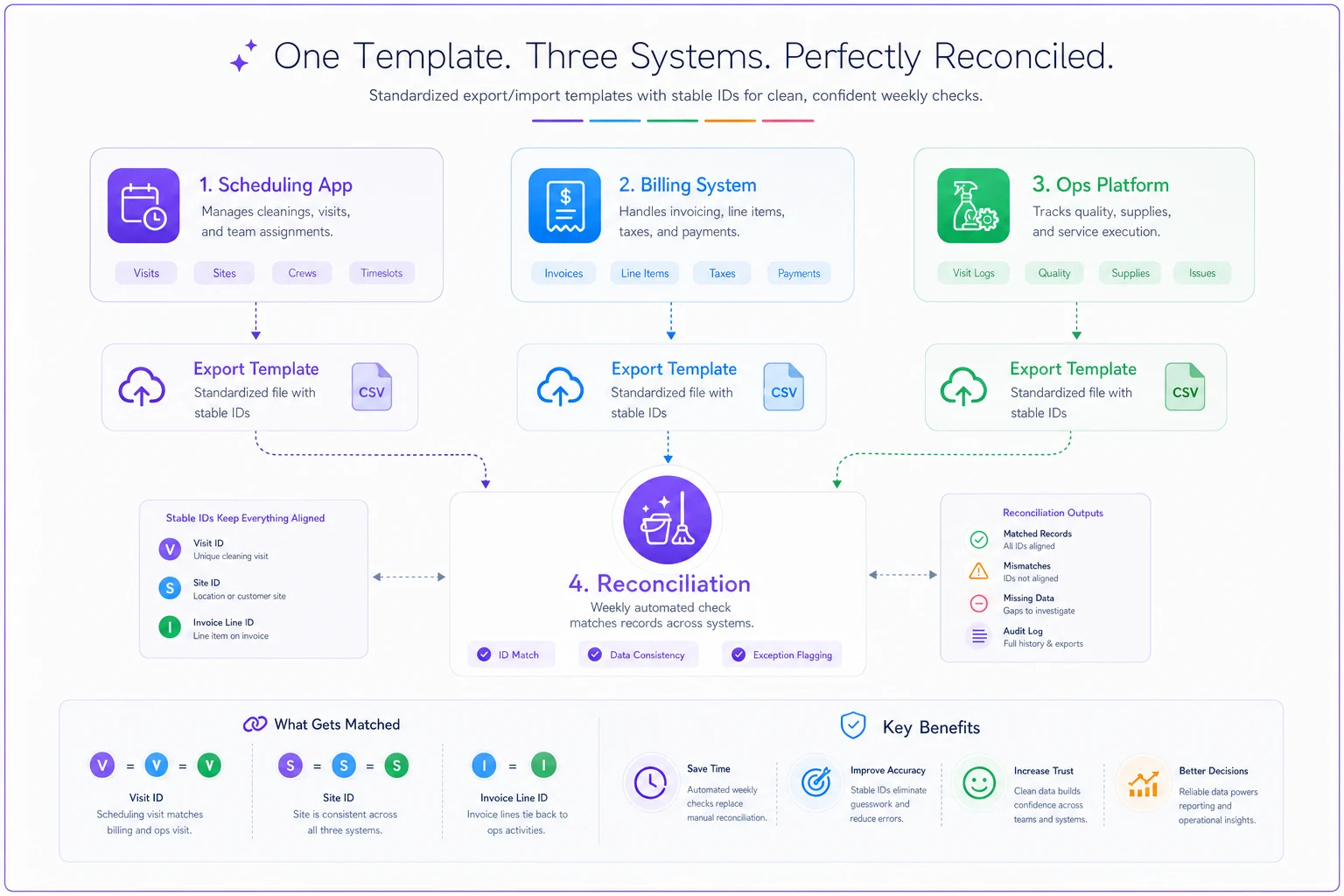
When all three exports share the same IDs, you can line them up in minutes instead of eyeballing addresses. A completed visit with no matching invoice line jumps out immediately. An invoice line pointing to a visit that was never marked complete jumps out too.
One practical warning: whoever sets up these exports should freeze the column structure and share it as a template. The most common way this breaks is a well-meaning office manager adding a column or renaming a header, which quietly breaks whatever downstream check relied on that layout. Treat the template like a contract.
Sync schedules: how often is "often enough"?
You don't need real-time syncing to keep your data clean. You need predictable syncing. The mistake operators make is either syncing manually whenever someone remembers (chaos) or assuming that because two tools are "connected," everything flows perfectly (also chaos, just quieter).
| Data type | Sync / reconcile frequency | Why |
|---|---|---|
| Visit completion status | Daily | Yesterday's jobs should be settled before today's start |
| New clients / sites / contracts | Weekly | Catches setup errors before they hit billing |
| Billing vs completed visits | Weekly, hard-close monthly | Stops revenue leakage before invoices go out |
| Dashboard / KPI refresh | Weekly | Keeps reported numbers close to reality |
| Full audit reconciliation | Monthly | Catches anything the routine checks missed |
The single most valuable habit is the weekly billing-vs-visit reconciliation. That's where money actually leaks. Completed work that never gets billed is pure lost margin, and it hides well because nobody complains about an invoice they never received. If your dashboards feed off the same clean data, your reported numbers stay trustworthy too — which matters a lot if you're using the cleaning KPIs that actually predict contract performance to make decisions.
Non-technical reconciliation checks anyone in the office can run
You don't need to understand databases to keep data clean. You need a short list of "does this make sense?" checks that a non-technical person can run in under 30 minutes a week:
-
Orphan check Any site with no linked client? Any visit with no linked site? Any invoice line with no linked visit? All three should be zero.
-
Duplicate check Sort clients by name. Any near-identical entries? Merge them, keeping the older ID as the survivor.
-
Completed-but-unbilled Filter for completed visits in the period with no matching invoice line. This is your leak list.
-
Billed-but-not-completed The reverse. These are dispute risks — you billed for work with no completion record.
-
Rate mismatch Spot-check five contracts. Does the rate in scheduling match the rate in billing? A drift here means someone updated one system and forgot the other.
-
Status stuck Any visit marked "in progress" for more than 48 hours? Usually a crew that forgot to close out in the field app.
Run these in the same order every week and log the counts. When "completed-but-unbilled" starts climbing, you've found a workflow gap before it costs you a quarter of margin.
What breaks at scale (and why it sneaks up on you)
At three or four crews, you can hold the whole picture in your head. You know the Riverside job got an extra visit last week, so when the numbers look off, you mentally correct for it. That instinct is exactly what fails as you grow.
Under 5 crews: Data errors are annoying but self-correcting because one person sees everything. Reconciliation is basically "the owner remembers."
5 to 15 crews: The owner can no longer hold it all. Scheduling, billing, and client setup get owned by different people with different conventions. Duplicates and mismatches start compounding. This is where most operators first feel the pain — usually as a run of billing disputes or a dashboard number that "can't possibly be right."
15+ crews and multi-site accounts: The data problems become financial problems. A single national account with 30 sites, each with slightly different scopes and frequencies, is impossible to reconcile by memory. If your visit records and billing lines don't tie back to stable IDs, you will under-bill some sites and over-bill others, and a sophisticated client's AP department will catch it. That's not just lost revenue — it's a credibility hit that puts renewals at risk.
The through-line: manual reconciliation scales linearly with headcount, but data errors scale exponentially with the number of connections between records. That gap is why operators who ignore data hygiene tend to hit a wall around 15 crews where growth stops feeling like progress and starts feeling like firefighting.
A real scenario
A regional operator running about 18 crews across roughly 90 sites kept seeing a stubborn gap between reported revenue and actual collections — somewhere in the range of $4k–$6k a month that never seemed to reconcile. Nobody was stealing. The work was getting done.
When they ran a proper completed-but-unbilled check for the first time, the picture cleared up fast. Emergency and add-on visits logged by crews in the field app were never flowing into billing, because those visits got created outside the normal contract schedule and nothing linked them to an invoice line. Roughly 40–50 visits a month were slipping through — small individually, real in aggregate.
The fix wasn't a new system. It was assigning stable Visit IDs to every job (scheduled or ad hoc), standardizing the visit export, and adding the weekly completed-but-unbilled check to the office routine. Within two months the gap mostly closed, and the recovered add-on revenue more than paid for the hour a week the check took. The dashboard numbers also started matching reality, which meant margin decisions were finally based on something real.
Where software helps — and where it doesn't
Tools matter here, but not the way vendors pitch it. Connecting two apps with an integration doesn't create clean data; it just moves whatever you have — good or bad — faster. If your records don't share stable IDs and an agreed owner, an integration will happily sync your duplicates and mismatches into every system at once.
Where an AI-assisted operations platform genuinely earns its place is in the repetitive reconciliation work: automatically flagging orphaned records, surfacing completed-but-unbilled visits before invoices go out, catching rate mismatches between scheduling and billing, spotting duplicate client entries before they multiply. That kind of pattern-matching is exactly what a person doing a manual weekly check will eventually get tired of and skip. The value is making the discipline sustainable — so the checks still happen in month nine, not just month one.
But the decisions — what's the source of truth, what defines a client, which record wins in a conflict — those are yours. Software enforces the model; it doesn't invent it. Operators who try to buy their way out of the modeling work usually end up with a very expensive, very fast way to be wrong. If you're mid-migration, it's worth pairing this with a deliberate rollout approach; the cleaning software migration and crew-adoption playbook covers how to lock in adoption so the clean data actually stays clean.
When this level of rigor makes sense — and when it doesn't
When it's worth it: You're past 5 crews, running more than one tool, or serving multi-site clients. Any of those and the canonical model pays for itself, usually in recovered billing alone.
When it's overkill: You're a two-crew operation with one scheduling app that also handles invoicing. Building a formal canonical model here is solving a problem you don't have. Keep your client list clean, don't run parallel spreadsheets, and revisit this when you add a second tool or a fifth crew.
Who should be careful: Operators mid-growth who are tempted to "fix it later." Later is when you have three times the records and the duplicates have already propagated everywhere. The cheapest time to define your data model is before you scale the mess.
There's also a pricing angle worth noting. Clean visit-and-contract data is the foundation for any pricing decisions you make. If your rates and scopes drift between systems, your margin math is built on sand. A modular pricing engine for mixed contracts only works if the contract data feeding it is actually accurate — which loops right back to hygiene.
Bringing it together
Data hygiene isn't a technical chore you do once and forget. It's an operating rhythm: decide what's true, give every important record a stable ID and an owning system, standardize how data moves in and out, and run a short set of sanity checks on a predictable schedule.
Get that rhythm right and the payoff shows up everywhere at once — invoices match the work, dashboards match reality, disputes drop, and you stop losing sleep over whether the numbers you're steering the business with are real. The operators who scale past the 15-crew wall without chaos aren't the ones with the fanciest tools. They're the ones who decided, early and clearly, what version of the truth their whole business would agree to run on.
Get that rhythm right and the payoff shows up everywhere at once — invoices match the work, dashboards match reality, disputes drop, and you stop losing sleep over whether the numbers you're steering the business with are real. The operators who scale past the 15-crew wall without chaos aren't the ones with the fanciest tools. They're the ones who decided, early and clearly, what version of the truth their whole business would agree to run on.
Ready to simplify your cleaning operations?
Join 1,000+ cleaning businesses using Wipyly to save time, reduce scheduling conflicts, and enhance client satisfaction.