

You're three hours into a deep clean when the client points to the garage. "While you're here, can you just..." Those four words probably cost cleaning companies more profit than anything else in the business.
The problem isn't the extra work itself. It's what happens next — no documentation, verbal pricing that gets disputed later, cleaners doing $200 of extra work that never gets billed, or worse, losing the client entirely over a charge they swear they never agreed to.
Most cleaning companies handle change orders terribly. Cleaners scribble notes on scrap paper. Photos sit on personal phones. Pricing gets figured out after the fact. By the time you try to invoice for extra work, it's your word against the client's memory from three weeks ago.
The real cost of undocumented scope changes
A typical residential cleaning company with 15 regular crews sees scope creep on roughly 30% of jobs. Commercial contracts are worse — facility managers treat crews like their personal cleaning army, constantly adding "quick favors" that stack up into hours of unbilled labor.
Here's a standard scenario: Your crew shows up for a regular office clean. The property manager mentions the conference room needs extra attention before tomorrow's board meeting. Your cleaner, wanting to keep the relationship solid, spends an extra 45 minutes on it. No photos, no written confirmation, just a verbal "thanks."
Two weeks later you add $85 to their invoice for the extra work. The manager says they never authorized additional charges — they just asked for "normal cleaning with extra care." Now you're stuck either eating the cost or fighting with a client worth $2,800 in monthly recurring revenue.
Multiply that across your operation. If each crew hits two undocumented scope changes per week and you recover payment on maybe half of them, you're losing $600–800 per crew per month. For a 10-crew operation, that's somewhere in the range of $72,000–96,000 a year in margin that just disappears.
Where traditional documentation breaks down
The first thing most companies try is paper forms. Give cleaners a change order pad, have them write down extras, get a signature. Simple enough in theory.
Stop losing bookings in operational chaos.
Wipyly helps you manage, confirm, and optimize every cleaning appointment efficiently.
- Centralized booking management
- Automated client notifications
- Staff scheduling & route optimization
No credit card required
In practice: your cleaner, wearing gloves covered in cleaning solution, has to find the form, write legibly while a client waits impatiently, calculate pricing on the spot, and somehow keep that paper safe through the rest of their route. The client signs something they barely read because they're in a hurry to get back to their day.
Digital forms on tablets seem like the fix but create different headaches. Cleaners fumble with devices while wearing gloves. Tablets get damaged by cleaning chemicals. Pulling out a device and navigating to the right screen mid-job kills the service flow.
Phone-based systems where cleaners text photos to the office sound practical until your dispatcher is spending three hours a day sorting through random images from 15 different numbers, trying to match them to jobs and invoices. Photos pile up in WhatsApp threads with zero context about which room, what was requested, or what was actually quoted.
Building a capture workflow that actually works
Layer 1: Visual context capture
-
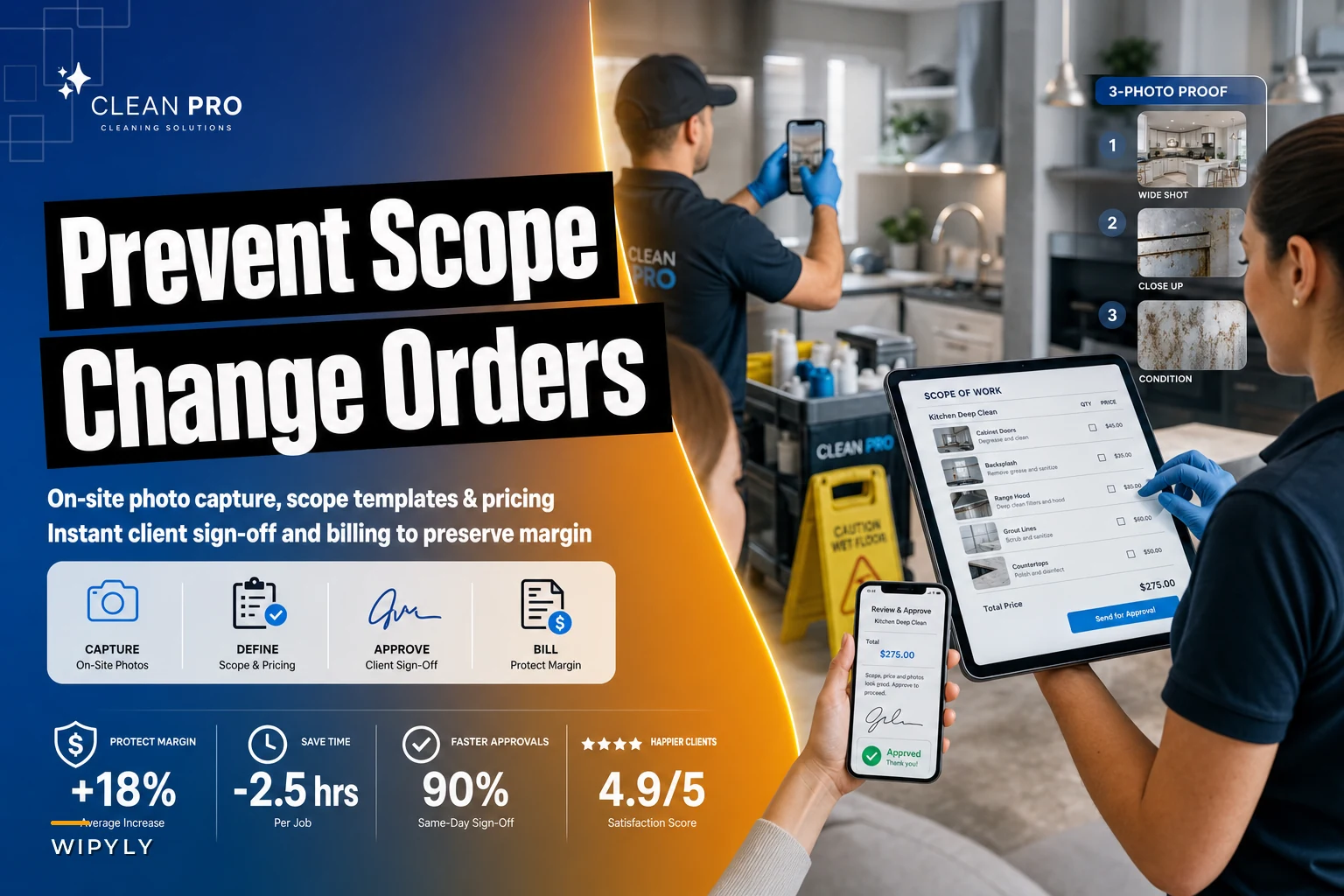
Wide shot showing the full area
-
Close-up of the specific request
-
Current condition, especially for damage or heavy soil
These go directly into a job-linked folder, not personal phones. Smart operations use QR codes at each client location that link to the specific job file.
Layer 2: Structured scope confirmation
Instead of free-form descriptions, use pre-built scope templates:
| Extra Service Type | Base Time | Base Price | Photo Required |
|---|---|---|---|
| Garage cleaning | 45 min | $65 | Before + After |
| Refrigerator interior | 20 min | $35 | Before only |
| Baseboards (per room) | 15 min | $25 | One per room |
| Window interiors | 30 min | $45 | Count verification |
| Cabinet fronts | 25 min | $40 | Before + Product used |
Cleaners select from the menu, adjust quantity if needed, and pricing calculates automatically. No math errors, no underquoting, consistent pricing across all crews.
Layer 3: Real-time authorization
The client gets an immediate notification with photos of the requested areas, itemized pricing, estimated completion time, and a simple approve/decline button — while your crew is still on-site. No surprises on the invoice later, no "I never agreed to that" calls.
Use QR codes at each location so photos go straight to the right job folder without manual matching.
A quick visual of the on-site capture and approval steps helps crews remember the sequence.
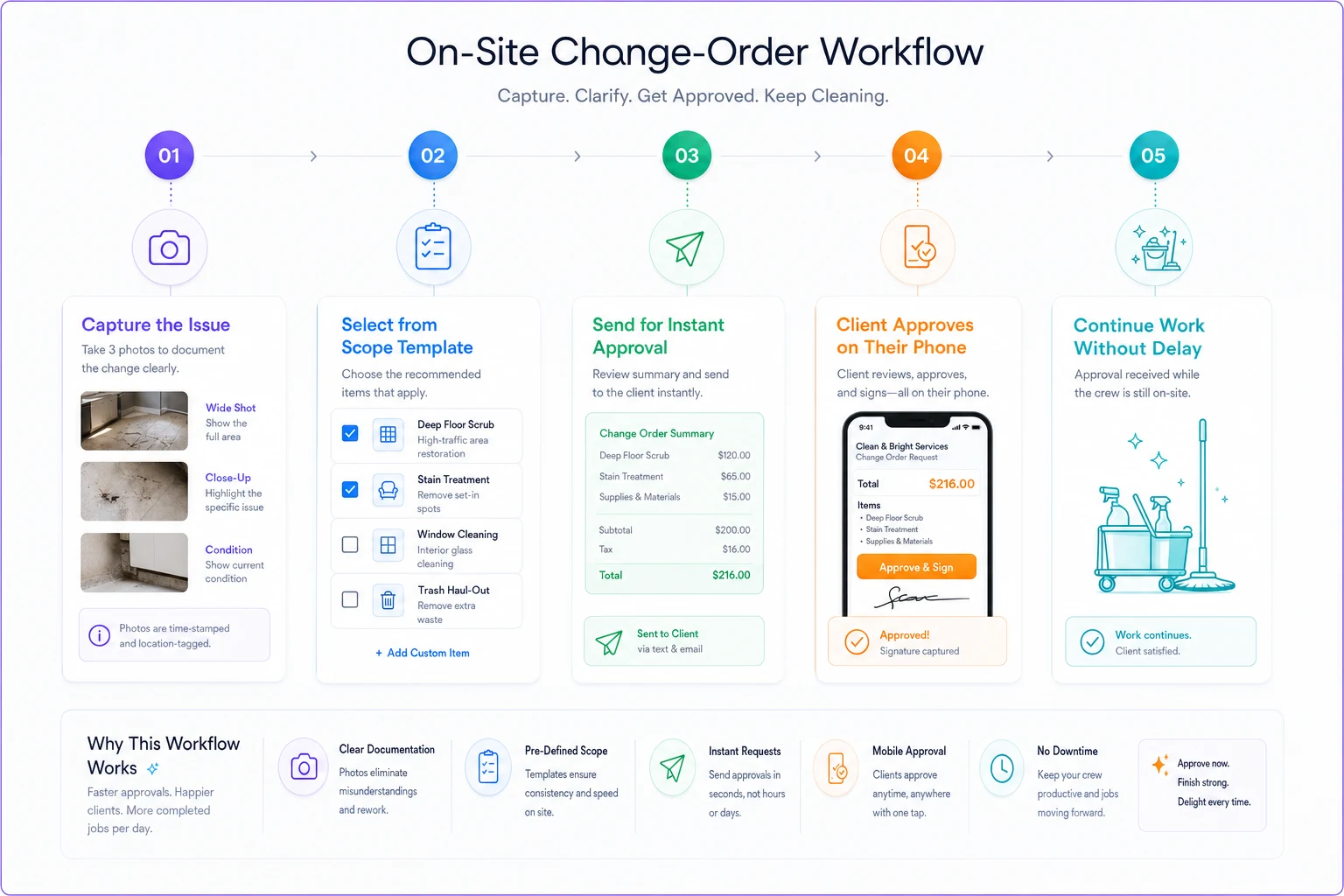
No surprises on the invoice later, and a clear authorization trail tied to the job.
The sign-off rules that prevent disputes
Getting a signature isn't enough on its own. You need clear authorization protocols that hold up when a client challenges a charge weeks after the fact.
Who can authorize extras:
For residential: Only the homeowner or a pre-designated contact listed in your service agreement. Not the teenager home from college, not the contractor working in the kitchen.
For commercial, define authorization levels at the start of the contract:
-
Under $50
Shift supervisor
-
$50–200
Facility manager
-
Over $200
Property manager or above
Put these rules in your initial service agreement and reference them inside your change order process.
Time-sensitive confirmation:
If the client doesn't respond to the digital approval request within 10 minutes while the crew is still on-site, the work doesn't happen. Train your crews on this clearly — no response means no service. It sounds rigid, but it eliminates most disputes before they start.
For trusted long-term clients you might allow pre-authorized limits — something like "any single add-on under $75 can proceed without explicit approval." Just make sure that allowance is in writing, not a verbal understanding that evaporates when there's a billing disagreement.
Conditional work flags:
-
Photo documentation of the emergency condition
-
Proceed with work
-
Send an "emergency service rendered" notification
-
Reference clear contract language about emergency response authorization
Some extras can't wait for approval — emergency spills, health hazards, last-minute event prep. Create a separate workflow for those situations.
Protecting margin through smart pricing rules
The biggest profit leak isn't doing extra work — it's underpricing it when you do. Change orders should carry a premium for three reasons: they disrupt planned workflow, require immediate resource reallocation, and often involve tasks outside your standard service prep.
On-demand extras should generally run 40–60% above your normal task rates. A baseboard cleaning that costs $18 as part of a scheduled deep clean gets priced at $25–28 as an add-on. That's not gouging — it's covering the actual cost of deviating from a planned job.
Set minimum charges into your change order structure. Nothing under $25, regardless of scope. The administrative overhead alone to document, approve, and bill a tiny extra costs more than that.
For commercial accounts, consider pre-purchased service credit blocks. They buy 10 hours of additional service time at a 20% discount and draw down as needed. It reduces friction on their end while making sure you get paid upfront.
When to refuse scope changes entirely
Not every request should turn into a change order. Some should just be declined.
Liability expansions: Windows above the second floor, handling unknown chemicals, moving heavy furniture. Your insurance may not cover it, and no rate makes that risk worth taking.
Resource impossibilities: Adding two hours of work when your crew has three more stops scheduled. Don't wreck your whole route for one add-on.
Chronic scope creepers: The client who always has "just one more thing" every single visit. They need a different service tier, not an endless stream of change orders.
Build a refusal workflow too:
-
Document the request
-
Explain why it can't be accommodated today
-
Offer an alternative — scheduled deep clean, separate appointment, specialist referral
-
Log the interaction
This protects you when clients later claim you "refused to do your job" or demand discounts because you "didn't finish everything."
The billing integration that closes the loop
Change orders mean nothing if they don't connect cleanly to billing. The worst outcome is capturing everything perfectly on-site, then losing it somewhere between the field and the office.
Your billing system needs to automatically pull approved change orders into invoices, attach photo documentation, include authorization timestamps, and reference the specific person who approved the work.
When a client questions a charge, you're not scrambling through text threads and email chains. Everything is right there — the photos, the approval, the timestamp, the approver's name.
For dispute resolution, this documentation is what actually protects you. Most disputes disappear the moment you can show time-stamped photos and a digital approval trail. There's not much to argue about at that point.
Turning change orders into upsell opportunities
Clients asking for extra work are expressing trust. They're literally trying to buy more from you — they just haven't formalized it yet.
Track change order patterns by client. When someone requests garage cleaning three months in a row, propose adding it to their regular service at a bundled rate. When a commercial client consistently needs conference room touch-ups before meetings, pitch them an event-prep package.
The data tells you exactly what each client actually wants versus what they originally signed up for. That's useful information during renewal conversations.
Some companies run change order analytics monthly:
-
Most requested extras by service type
-
Clients with the highest change order frequency
-
Conversion rate from change orders to upgraded service agreements
-
Average revenue per change order by crew
It turns reactive scope management into a real growth signal.
Making it work without perfect technology
You don't need sophisticated software to start capturing change orders properly. Begin with basic tools:
Minimum viable setup:
-
Shared Google Drive folder structure organized by client
-
Photo upload app that auto-names files
-
Google Form for scope selection
-
Email template for approval requests
-
Spreadsheet tracking approvals and billing status
Train one crew on the process first. Work out the kinks before rolling it across the company. Consistency matters more than the tools — every extra, every time, same process.
As you scale, AI-powered operational software can handle a lot of this automatically. It can match photos to jobs, calculate pricing from historical data, route approvals to the right contact, and push everything directly into billing. But don't wait for perfect tools while the margin problem keeps bleeding. Start now with what you have.
Why most companies never implement this
The resistance to proper change order workflows usually comes from two places: cleaners who think it slows them down, and owners who worry clients will push back on the formality.
Cleaners resist because they've been trained to please clients above everything else. Stopping to document feels like bad service. The way to address this is showing them how many client complaints actually come from billing disputes rather than service quality issues. When they see that documentation prevents angry calls and protects their relationship with the client, adoption tends to follow.
Owners worry that formal change orders will annoy clients or seem bureaucratic. But clients generally prefer clarity over surprises. Most would rather approve a $40 charge on-site than see an unexplained line item on next month's invoice. A structured process often increases client confidence rather than friction.
Conclusion
The difference between cleaning companies that protect their margin and those that slowly bleed it often comes down to scope control. Every undocumented extra chips away at your bottom line. Every dispute over unauthorized work strains client relationships you spent months building.
A proper cleaning change order workflow isn't about nickel-and-diming anyone. It's about running professional operations where cleaners, clients, and owners all know what's expected, what's extra, and what it costs.
Start with your worst scope-creep client. Implement the capture workflow for just that account for one month. You'll probably find you've been giving away several hundred dollars in free services — and you'll have the framework to stop it across your whole operation.
The goal isn't to charge for every tiny extra. It's to make scope changes visible, documented, and profitable when you do them. Because those "while you're here" requests aren't going away. You might as well get paid properly for them.
Ready to simplify your cleaning operations?
Join 1,000+ cleaning businesses using Wipyly to save time, reduce scheduling conflicts, and enhance client satisfaction.