

Most cleaning operators already have more data than they think. Every scheduled job, every photo upload, every supply reorder, every crew clock-in is a data point. The problem is that it's scattered across a scheduling app, a payroll system, a WhatsApp thread, and three spreadsheets that only one person understands. None of it connects. So when a national account asks "why did your quality scores drop at these four sites last quarter," the honest answer is usually "give me a week and I'll try to piece it together."
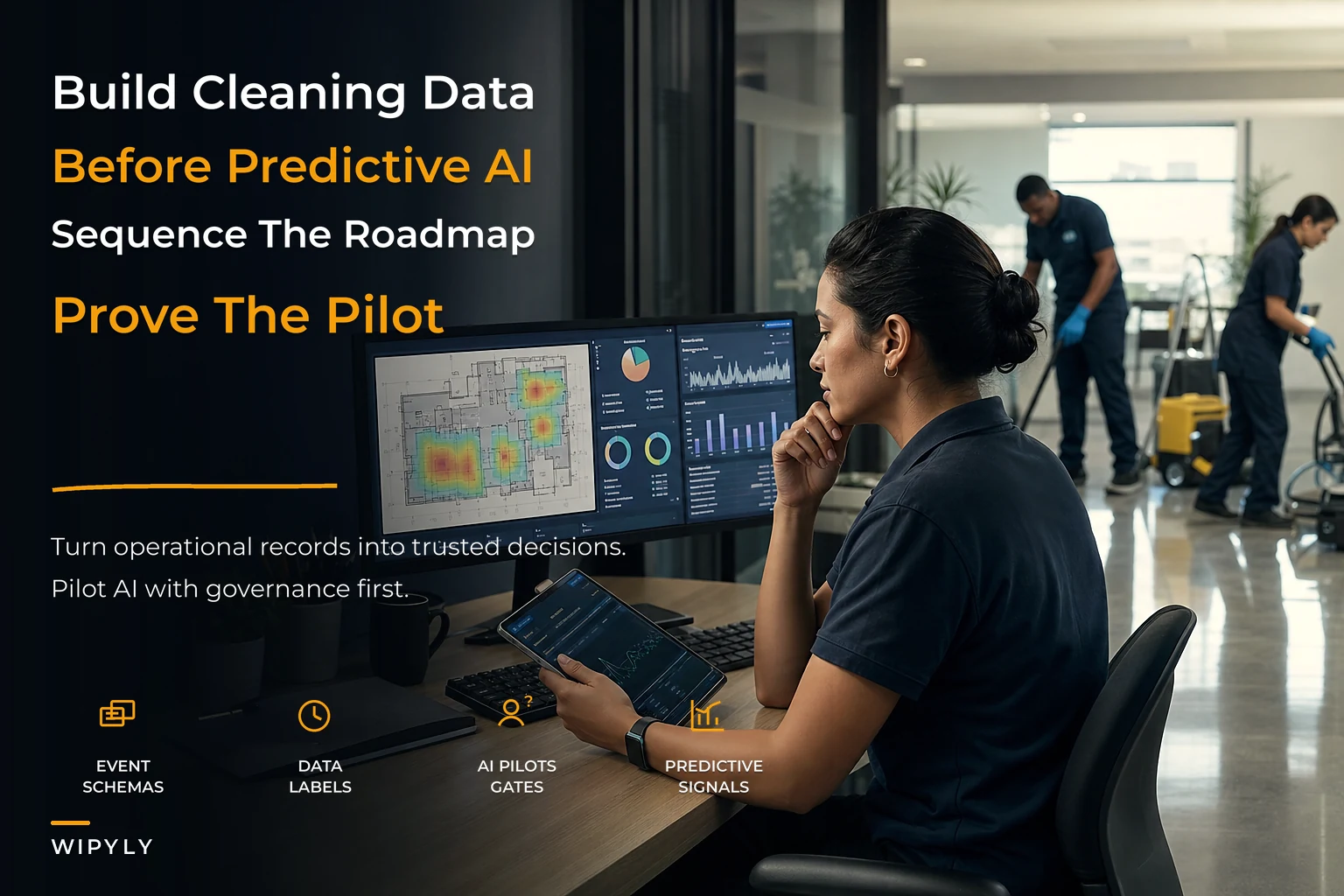
That gap — between data you technically have and data you can actually use — is where most operators get stuck. They jump straight to "we want AI to predict churn" before they can reliably answer "how many jobs did we actually complete last month, and which ones ran over time?" The roadmap below is built to fix that in the right order: instrument first, clean and label second, build operational reporting third, and only then run predictive pilots. Skip a stage and the whole thing collapses under its own bad data.
This isn't a theory piece. It's a staged path that works across operators running anywhere from 6 to 60 vans — with specific event names, labeling rules, and a governance checklist you can copy.
Why cleaning data breaks before it's useful
Cleaning operations generate data in bursts, in the field, from people who are mid-shift and not thinking about analytics. That creates a specific set of problems that don't show up in cleaner industries like e-commerce.
-
The same event gets recorded three different ways. One supervisor marks a job "done," another marks it "complete," a third just uploads a photo and moves on. Now you can't count completions reliably.
-
Timing data is fiction. Crews clock in when they remember to, not when they arrive. So your "actual hours" column is off by 15–40 minutes per job, which quietly destroys any labor-cost analysis built on top of it.
-
Context lives in people's heads. The reason a site took 90 minutes longer last Tuesday — a flooded restroom, a locked floor, a no-show teammate — never makes it into a field. It's in a text message that's gone by Friday.
What breaks at scale is coordination. At 5 accounts, the owner remembers everything. At 25 accounts across three area managers, nobody has the full picture, and the data is the only thing that could hold it together — except it was never structured to do that job. This is the same reason data integration and hygiene matters so much before you attempt anything predictive: garbage events produce confident, wrong predictions.
So the roadmap has to start lower than most owners want it to.
Stage 1 — Instrumentation: name your events before you collect them
Instrumentation just means deciding, on purpose, what you record and what each thing is called. The single biggest mistake here is letting event names emerge organically from whatever buttons people happen to press. You end up with 14 flavors of "job finished" and none of them are trustworthy.
Stop losing bookings in operational chaos.
Wipyly helps you manage, confirm, and optimize every cleaning appointment efficiently.
- Centralized booking management
- Automated client notifications
- Staff scheduling & route optimization
No credit card required
Define a small, boring, consistent set of event names and enforce them everywhere. Here's a working starter vocabulary tuned for cleaning:
| Event name | Fires when | Key fields to capture |
|---|---|---|
job_scheduled | Job placed on the calendar | siteid, servicetype, scheduledstart, estduration, crew_id |
crew_arrived | First crew member on-site (GPS or manual) | siteid, actualarrival, crew_id |
job_started | Work actually begins | siteid, startts |
task_completed | A line item on the scope is done | siteid, taskcode, completed_ts |
photo_captured | Evidence photo uploaded | siteid, taskcode, geo, timestamp |
job_completed | Full scope marked done | siteid, endts, crew_id |
qa_scored | QA or audit performed | siteid, score, auditorid, fail_reasons[] |
issue_flagged | Something went wrong on-site | siteid, issuetype, severity, note |
consumable_used | Supplies drawn for the job | site_id, sku, quantity |
rework_requested | Client or QA sends crew back | siteid, reasoncode, originaljobid |
Three rules make this stick:
-
One event, one meaning.
job_completedis not "crew left the building." It's "scope complete and evidence attached." Write the definition down. -
Every event carries
site_idand a timestamp. Without a shared key, you can never join a QA score to the job it belongs to. -
Severity and reason codes are picklists, not free text. Free text is where analytics go to die. Give people 6–8 options for
issue_typeand let them pick.
You don't need all of these on day one. If you can only instrument four events well, pick jobscheduled, crewarrived, jobcompleted, and qascored. Those four alone unlock schedule reliability, punctuality, and quality — which is most of what actually matters.
If you can only instrument four events well, pick
jobscheduled,crewarrived,jobcompleted, andqascored.
When this makes sense: always. Instrumentation is the foundation, and it's cheap. When it goes wrong: when owners try to instrument 30 events at once and crews revolt because every job now takes 11 extra taps. Start small.
Stage 2 — Curated datasets and labeling rules
Raw events are not a dataset. A dataset is raw events that have been cleaned, deduplicated, and labeled so a human or a model can learn from them. This is the stage everyone wants to skip, and skipping it is why most "AI pilots" in this industry quietly die.
Labeling rules worth standardizing early:
-
Missed job. Label a job as
missedonly if there's nocrew_arrivedevent within the SLA window AND no approved reschedule. A late job is not a missed job — keep those separate or your numbers lie. -
On-time.
crewarrivedtimestamp is within the agreed window (say ±15 min) ofscheduledstart. Be strict. "Close enough" labeling teaches you nothing. -
Rework event. Any
jobcompletedfollowed by areworkrequestedfor the same site within 72 hours. That 72-hour window is a judgment call — pick one and apply it consistently. -
Quality failure. A
qascoredevent below your pass threshold, with at least onefailreasonattached. Scores with no reason codes get flagged as incomplete data, not clean fails.
Here's a tiny sample of what a curated job-level dataset row actually looks like once events are joined:
| job_id | site_id | service_type | scheduled_start | actual_arrival | on_time | duration_min | est_duration | qa_score | rework_72h | consumables_cost |
|---|---|---|---|---|---|---|---|---|---|---|
| 10482 | S-14 | maintenance | 06:00 | 06:08 | yes | 142 | 120 | 88 | no | $6.40 |
| 10483 | S-22 | deep | 07:30 | 08:05 | no | 310 | 240 | 71 | yes | $19.10 |
| 10484 | S-07 | maintenance | 06:00 | — | — | — | 120 | — | — | — |
Row 10484 is the honest one — a missed job, nothing recorded after scheduling. A clean dataset keeps that row instead of silently dropping it, because missed jobs are exactly what you'll want to predict later.
The patterns you can already see without any model: Site S-22's deep cleans run 70 minutes over estimate and score poorly and generate rework. That's not an AI insight. That's just clean data finally telling the truth. Getting consistent definitions across operations and billing matters here too — if your "completed job" count doesn't match what finance invoices, you've got a reconciliation problem, which is squarely a metric governance issue, not an analytics one.
Stage 3 — Operational analytics: reporting before prediction
Before you predict anything, you need to describe reality reliably. Operational analytics means dashboards and reports that answer "what happened and where" — the layer most operators can genuinely run on their own.
The reports that earn their keep first:
-
Punctuality by site and crew — percent of jobs with
on_time = yes, trended weekly. -
Over-run heatmap —
durationminvsestduration, grouped by service_type. This is where underquoting hides. -
Rework rate by site — rework events per 100 completed jobs.
-
QA fail-reason Pareto — which 3 reasons cause 80% of failures.
-
Consumables cost per job by site and service type.
The discipline here is connecting these to outcomes that matter, not vanity metrics. A dashboard that tracks "total photos uploaded" tells you nothing. A dashboard that ties punctuality and rework to contract health tells you which accounts are about to become problems. If you haven't settled on which metrics actually predict account performance, that groundwork is worth doing first — the cleaning KPIs that predict contract performance are a better starting point than inventing your own framework from scratch.
One pattern worth calling out: operators consistently overvalue averages and undervalue variance. A site averaging 90 minutes with a 20-minute swing week to week is a scheduling nightmare, even though the average looks fine. Report the spread, not just the mean.
Report the spread, not just the mean.
A simple workflow for turning a report into action: the over-run heatmap flags Site S-22. An area manager pulls the job history, sees the deep cleans consistently run long, checks the scope against the quoted hours, and either re-times the job or re-prices it at renewal. No model required — just clean data plus a human who's responsible for acting on it. Most of your ROI lives right here, in Stage 3, before you ever touch prediction.
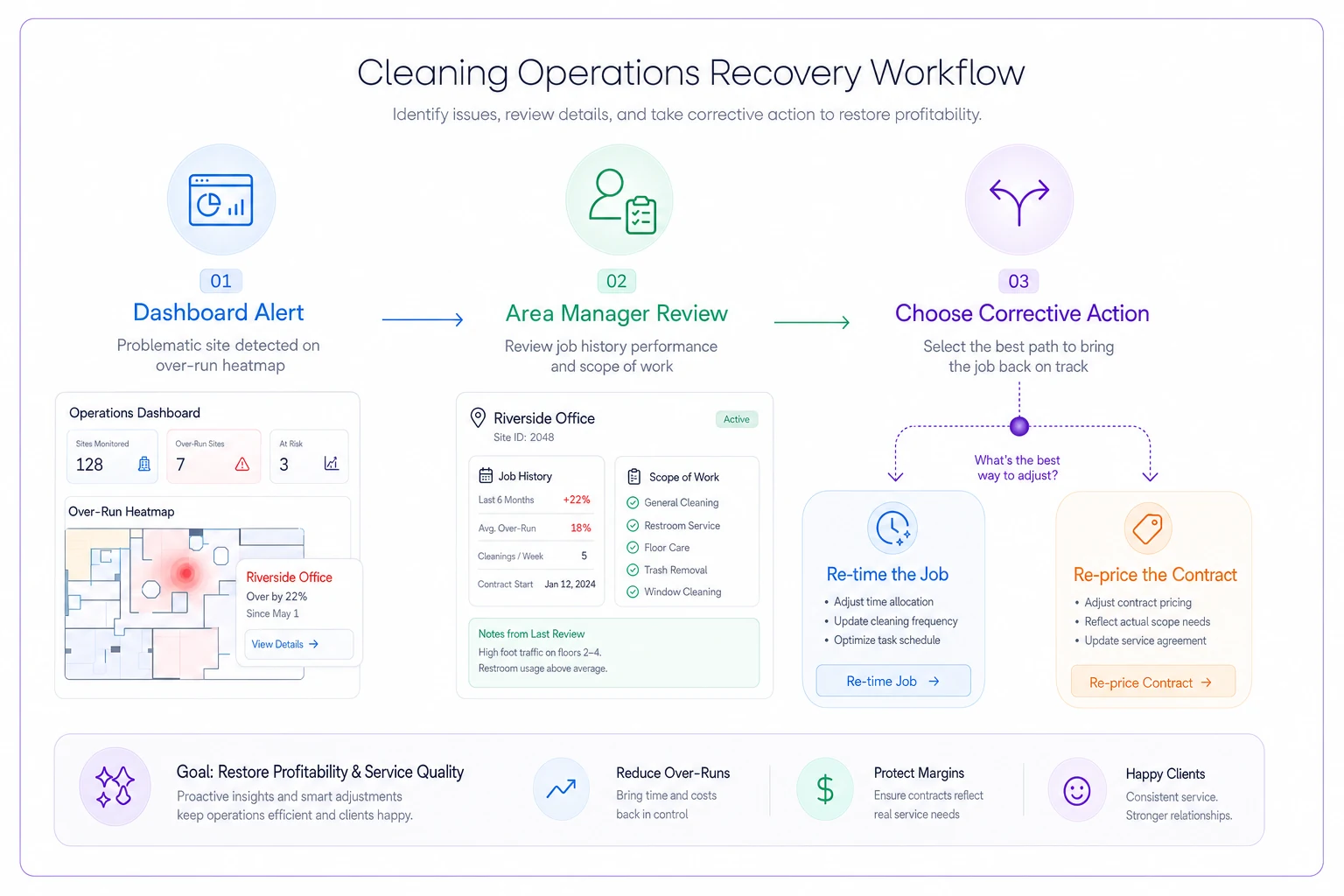
This illustrates the handoff from analysis to action.
Stage 4 — Predictive pilots: start narrow, prove value, govern hard
Only after Stages 1–3 are stable should you run predictive pilots. And even then — pick one use-case, keep it small, and attach it to a decision someone will actually make.
Here are the three highest-value predictive use-cases for cleaning operators, roughly in order of how quickly they pay off:
1. Missed-job prediction. Using patterns like crew assignment, recent punctuality, same-day route load, and historical no-shows at a site, flag jobs with elevated risk of being missed the day before. The action is simple — a dispatcher double-checks coverage on flagged jobs. Even a mediocre model that catches half your misses in advance saves real SLA penalties.
2. Consumables forecasting. Predict per-site supply draw based on service type, square footage, frequency, and seasonality. This cuts both emergency reorders and overstock. It's also a gentler pilot because a wrong prediction costs you a few dollars, not a client.
3. Crew churn risk. Using signals like declining hours, rising rework flags, schedule volatility, and commute distance, flag crew members at elevated risk of leaving so you can intervene early. This one ties directly into how you plan staffing around renewals — pairing churn risk with predictive staffing for renewals is where it gets genuinely powerful, because losing a crew lead right before a renewal is how accounts get lost.
Pick missed-job or consumables for your first pilot. Crew churn is tempting but politically sensitive and needs the most history to get right.
A governance-first AI pilot checklist you can copy
Run every pilot through this before it touches a real decision:
-
[ ] Decision owner named. One person owns the decision the model informs. If no one acts on the output, kill the pilot.
-
[ ] Baseline measured first. You know your current missed-job rate / stockout rate before the pilot, or you can't prove it helped.
-
[ ] Scope is one use-case, one set of sites. No "let's predict everything."
-
[ ] Data lineage documented. You can trace every input back to a defined event. No mystery features.
-
[ ] Success metric defined up front. E.g., "reduce missed-job SLA penalties by 25% over 8 weeks" — written down before you start.
-
[ ] Human-in-the-loop. The model recommends; a person decides. No automated client-facing actions during a pilot.
-
[ ] Failure mode considered. What happens when the model is wrong? If a false positive costs a client, add a check.
-
[ ] Review date on the calendar. A fixed date to keep, adjust, or kill it. Pilots without end dates become zombies.
-
[ ] Privacy and crew fairness reviewed. Especially for churn models — be deliberate about what crew data you use and why.
The checklist isn't bureaucracy for its own sake. It's what stops a pilot from quietly making decisions nobody validated. The governance habits that keep this clean are the same ones that keep operations and billing aligned — if you've already built that muscle, predictive pilots are far less scary.
A real scenario: midsize janitorial operator, 22 accounts
An operator running about 22 commercial accounts with 14 crews was losing roughly $3k–$5k a quarter in SLA penalties, almost all tied to missed and late starts they only discovered after the client complained. Their data was spread across a scheduler and two spreadsheets, and "completed" meant different things to different supervisors.
They spent the first six weeks purely on Stages 1 and 2 — locking down five event names (jobscheduled, crewarrived, jobcompleted, qascored, issue_flagged), enforcing picklists, and cleaning three months of history into a job-level dataset. No prediction at all yet.
The operational reporting in Stage 3 alone surfaced that roughly 70% of their misses clustered in two early-morning routes with chronic coverage gaps. Fixing the scheduling on those routes — no model involved — cut missed jobs noticeably within a month.
Only then did they pilot missed-job prediction on those two routes. The model flagged high-risk jobs the night before, a dispatcher confirmed coverage, and over the next quarter their penalty exposure dropped to under $1k. The win wasn't the model. The win was that by the time they ran it, their data was clean enough for the model to be worth trusting.
When a predictive pilot is a bad idea
Be honest about readiness. Skip prediction entirely if:
-
Your event definitions still aren't consistent across supervisors. You'll model noise.
-
You have less than a few months of clean history. Not enough signal.
-
No one owns the resulting decision. A prediction nobody acts on is theater.
-
You're under 8–10 accounts. Your head still holds the whole operation; Stage 3 reporting is plenty.
The operators who get the most from analytics are rarely the ones chasing the fanciest models. They're the ones who did the unglamorous instrumentation and labeling work first, so that every number on their dashboard actually means something.
Bringing it together
A data strategy for cleaning operators isn't a software purchase or a model — it's a sequence. Instrument your events with consistent names. Curate and label them into datasets you can trust. Build operational reporting that tells the truth about what's happening across your sites. Then, and only then, run tight, governed predictive pilots against one real decision at a time.
The failure points are predictable: event names that drift, timing data nobody trusts, context that evaporates into text threads, and pilots launched on dirty data that produce confident nonsense. Fix the foundation in order and the predictive layer becomes almost boring — in the best way. It just quietly tells you which jobs are about to slip and which sites are about to cost you, early enough to do something about it. That's the whole point.
The failure points are predictable: event names that drift, timing data nobody trusts, context that evaporates into text threads, and pilots launched on dirty data that produce confident nonsense. Fix the foundation in order and the predictive layer becomes almost boring — in the best way. It just quietly tells you which jobs are about to slip and which sites are about to cost you, early enough to do something about it. That's the whole point.
Ready to simplify your cleaning operations?
Join 1,000+ cleaning businesses using Wipyly to save time, reduce scheduling conflicts, and enhance client satisfaction.